
FROM THE CLASSROOM
Our staff publishes in-depth King Air articles drawn from decades of real-world flying, instruction, and simulator experience. These pieces go beyond generic overviews, diving into model-specific systems, operational techniques, maintenance considerations, and real-world scenarios unique to the King Air fleet. Written by instructors who train exclusively in King Airs, the articles reflect practical knowledge gained in the cockpit and the simulator, offering pilots clear, actionable insights they can apply immediately to safer, more efficient operations.
Whoa, Not So Fast! (Yaw Damper) by Tom Clements
When do you turn on the Yaw Damper after takeoff in your King Air 200? I observe many pilots make this the second step of their after takeoff flow pattern: Gear up; Yaw Damp on. I want to convince you to make it the fourth step.
I teach the use of what I call “The Y Pattern” after liftoff. This pattern gets its name from the location of the controls or switches being touched. The first step, the upper right extreme of the Y, is to raise the landing gear handle. The second step, the upper left portion of the Y, is to turn off the landing and taxi lights. (They do not shut off automatically and the nose wheel well can get very hot resultant decreased bulb life if they remain on too long.) The third step is to reach to the center of this rather poorly-shaped Y and retract the flaps.
Yes, yes, I realize that many if not most pilots tend to takeoff with no flaps, especially on longer runways…and that is as it should be. However, when the runway length is limited, the charts often prove that more payload may be safely carried by use of Approach flaps. Since we use the flaps somewhat rarely, it is very, very, easy to overlook their being extended and to climb out to or well past pattern altitude before recognizing our mistake. Oops! So that is why I encourage you to always check the flap handle as the third after takeoff step, even though you may need to move it to the Up position only once in a blue moon.
Step Four? Finally, we reach to the bottom of our little Y and activate the Yaw Damper.
“But, Tom, that’s too late! I don’t want my passengers to be subjected to un-damped yaw that long!” I agree that passenger comfort is a wonderful goal…but never at the expense of passenger (and pilot!) safety. Let me explain.
First, I am not talking about a lengthy delay. Since the POH procedures call for flap retraction at 400 feet HAA (Height Above Airport) after accelerating to VYSE, that’s the attitude I suggest you use for Yaw Damper activation. So, at the most, we are talking about thirty seconds or so after liftoff before we get the increased ride comfort provided by the YD.
Second, is the Yaw Damper so much better in damping yaw than your own feet? For some, sadly, the answer will be a resounding, “Yes!” Others, perhaps more experienced and with a tailwheel endorsement, will realize that aggressive and proper rudder control can do nearly as good a job of damping yaw than the electronic marvel. (But it does get tiring, so the Yaw Damper is certainly welcome, at or above 400 feet!)
So where is the safety issue I mentioned? It is this: Having the Yaw Damper on makes aircraft heading control and inoperative engine identification more difficult.
Realize that the YD only helps to prevent yaw. It does not, unlike Rudder Boost, help apply force to the necessary pedal. I am sure you’ve tried moving the rudder pedals with the Yaw Damper on, right? What did you feel? A typical response is “The pedals felt like they were in concrete!” Yep, they are certainly stiff and unresponsive when the Yaw Damper is engaged…and that makes keeping the nose straight following a low altitude engine failure just that much more difficult. Also, when it comes to “Dead Foot, Dead Engine,” the Yaw Damper makes it more difficult to positively and immediately differentiate the active from the inactive foot.
That is why Yaw Damper activation should be relegated to its proper position as step four after lift Save & Exit off, not before. Please don’t rush it.
Pro Pilot vs Owner Pilot - by Zach Cleaver
At King Air Academy, we see a wide range of pilots for training. Pilots who just passed their multiengine check ride to pilots with thousands of hours in King Airs. What separates the owner-pilot from the professional pilot? Let’s take a look:
The first one to jump out is checklist usage. This really separates professional pilots from the rest. Pro pilots never waver from their use of checklists, ever. It is tempting to relax on their use, especially when you have flown the plane for thousands of hours, or it’s the third leg of the day; however, if we become complacent, the checklist is there to protect us from making mistakes. How should we approach checklist usage? There are three main ways: Read and Do, Flows, and Memory Items.
Read and Do – Read and Do is very straightforward, line by line, read each item, and do each item. As you learn the plane and the checklist, it gets faster and faster to move through each item.
Flows – Airline pilots are taught flows from the start of their training. Working in a crew environment truly shows the advantage of this method. Each pilot performs their flow, and the checklist is then used to verify that those items have been completed. After you gain experience in your aircraft, you will develop flows for different phases of flight backed up by a checklist. For example, performing the cockpit preflight setup as a read and do checklist takes quite some time, 20 minutes plus when first learning the plane, can be shortened to two to three minutes using a flow to check the positions of your switches, then pulling out the checklist and verifying that you have not missed any items. This will ultimately save a considerable amount of time during preflight. The key to this method is going back and verifying you didn’t miss any items with the checklist.
Memory Items – There is not much to say regarding memory items, but memorize them. These items are associated with EMERGENCY procedures that need to be completed methodically and accurately when time is of the essence. Every pilot should commit the memory items for their plane to memory and review them regularly so they don’t fade when they need them most. When a malfunction occurs, fly the plane, do your memory items, and when at a safe altitude and airspeed, pull out the emergency checklist. Read through the bold items in the checklist to verify you didn’t miss a memory item, and then start working on the rest of the emergency checklist as a read and do.
One last comment about checklists. Many King Air checklists from the factory have not been updated in years. They also will not reflect any modifications that have been made to the plane. Please have the most current factory-approved checklist as well as the appropriate supplements for your particular aircraft. This will ensure you have the most up-to- date normal, abnormal, and emergency checklists available in the cockpit. Remember, the AFM supplement checklists supersede the factory checklists.
Next topic up, Briefings:
Briefing on normal operations should be done every time. Briefing emergency situations before they occur is one of the most important things you can do to achieve a successful outcome in an abnormal or emergency event, especially close to the ground. This is something very few owner-pilots perform, but all professional pilots do. Don’t neglect to cover what switches and buttons you might use, as well as the weather conditions you might encounter.
What briefings are needed?
Taxi Brief – Brief the expected taxi route using your airport diagram. Both pilots should have the airport diagram displayed, even at airports you are very familiar with. When you receive your taxi clearance, write it down and make sure both pilots fully understand the route, noting any hotspots or runway crossings.
Takeoff and Departure Brief – Once you are at the runway, it’s time for the departure brief. Review the entire departure procedure and compare it with your navigation system; ensure the procedure matches what is programmed. Next is the takeoff brief, which should include, but not be limited to, runway number and length, takeoff distance required, V1 and VR speeds, what you will reject the takeoff for, when you will continue the takeoff, takeoff alternate airports, and route to get there if needed. An example is “This is my takeoff. Before 80kts, I will reject for any abnormality. Between 80 and V1/R I will reject for engine failure, engine fire, or loss of directional control. After V1/R I will treat it as an in-flight malfunction. I will return to runway XX, or I will divert to XYZ airport, runway XX.” The last part, and arguably one of the most important, is asking “Do you have any questions?” Now is the time to speak up if you have any questions!
Arrival and Approach Brief – Ideally, the arrival brief should be accomplished prior to starting your descent. Now is the time to review the arrival you have been assigned and verify that it is programmed correctly. Make sure you discuss routing, altitude restrictions, and how you expect to transition from arrival to approach (vectors, feeder leg, published heading to join the approach, etc.). Once the arrival has been covered, move on to the approach briefing. Verify that both pilots are looking at the same approach and that both plates are still valid. Again, make sure the navigation system is programmed correctly. Review the approach plate and make sure you fully understand all aspects of the approach. You can also include the expected runway exit and the expected taxi route.
Taxi Brief – After Landing – The same as before. Write it down, review the airport diagram, and follow along while you taxi. If you have any questions or doubts about what ATC asked you to do, ASK!
The last topic I want to touch on is training. Insurance companies require annual recurrent training to insure the aircraft and its pilots.
Professional pilots attend recurrent training at least once every 12 months, often more frequently due to flying multiple different aircraft types. Most owner-operators attend only once a year. The biggest difference we see between the two pilot groups is how well they prepare for training. Professionals spend time prior to training reviewing V-speeds, limitations, procedures (especially emergency procedures), and memory items. They have this information committed to memory prior to arriving at training. Many show up with a list of questions they would like answered or questions about why their plane behaved a certain way since the last time they were at training.
It is just as important for owner pilots to prepare prior to initial or recurrent training. Being prepared increases the amount that can be covered in both ground school and simulator sessions. While we all know how busy life gets, staying knowledgeable and proficient in your particular aircraft is extremely important. Consider bringing a list of questions, or contact your training provider in advance to request specific topics, airports, or approaches you would like covered. This will allow you to get the most out of your training.
Use your checklists, do your briefings, and go into training with a desire to improve your aviation skills! These simple steps will elevate your performance and increase safety in your aircraft!
Prop Sync Types (which do you have?) - by Tom Clements
How can you tell if your King Air has the older Type I or the newer Type II Propeller Synchrophaser system? There are two ways to tell from the cockpit.
First, does the label by the Prop Sync switch merely say “On-Off” or does it also have the statement “Must Be Off for Takeoff and Landing?” If you have the former, you have Type II. If you have the extra comment of the latter, it’s Type I.
The second way to tell involves turning the battery switch on. When you turn on the Prop Sync switch here, on the ground with the gear handle down – I sure hope so! – do you get a yellow “Prop Sync ON” annunciator? Yes? Then you have Type I. No? Then it’s Type II. Type I uses an electromechanical device on the right engine that can make minor adjustments to the governor attachment end of the propeller cable. It can make the cable longer to slightly increase the governor’s speed setting or shorter to decrease the speed setting in an attempt to make the right propeller speed match the left. The range is quite small, about 30 RPM total, or 15 RPM from neutral. Although limit switches inside the assembly should stop the motor and prevent any harm when and if the device drives the adjustment mechanism to an extreme, it is not uncommon to find that in fact, the mechanism binds up or jams when an extreme travel limit is reached.
The pilot has two ways of telling that his sync motor has jammed. First, the dang system is inop. Unless the propeller levers are carefully adjusted by the pilot, the disconcerting whaa-whaa sound of out-of-sync propellers is heard. Second, there now appears a significant misalignment, or stagger, between the left and right propeller knobs in the cockpit.
If the right knob is well behind the left, then the sync motor has probably jammed in the “Increase RPM” position, making the cable longer and requiring the knob in the cockpit to be further back to compensate for the longer cable. Vice versa, if the right knob is forward, the likelihood is that the mechanism is jammed in the “Decrease RPM,” or short, position.
Luckily, it is usually fairly easy for maintenance personnel to access the assembly, get it back to neutral, and adjust the limit switches as needed.
This tendency to jam when reaching a limit is why the extra panel statement – Must be Off for Takeoff and Landing – is a required placard. Whenever the combination of power and airspeed are both sufficiently low such that the propellers are not yet on their governors, there is no way that they will always have their speeds perfectly matched. This will certainly occur during the early stages of the takeoff roll and during the flare and rollout stages of the landing. If sync is on now, the poor mechanism will assuredly be driven to a limit. In fact, as the pilot or the wind gusts cause some speed fluctuations, there is an excellent chance that the mechanism will be driven back and forth from one extreme to the other…just asking for a problem.
Although the placard only speaks of takeoffs and landings, the switch should always be off whenever there is a reasonable chance that the propellers will not be at or near the identical speed. Doing slow flight and stall practice, during any simulated or actual single-engine maneuvering…make sure the switch is off. When you fly a King Air for the first time, you should have the switch off when moving the propeller levers from takeoff to climb speed and from climb, speed to cruise speed. This allows you to find and know what, if any, propeller lever stagger is required in this particular airplane to set the governors at the same speed. Since the adjustment range of the sync system is small, you need to make sure the propeller speeds are very close together before using sync. However, once you know, for example, that the left knob needs to trail the right knob by 1/8 of an inch, then it is perfectly acceptable to leave sync on when changing RPM.
Type II, on the other hand, does not have a slave (right) unit attempting to follow a master (left) unit. Instead, the slower always tries to rise to the faster speed, but again in a very limited range. Furthermore, and more important, there is no electromechanical mechanism to bind up or jam! Instead, speed adjustments are made by varying the strength of a magnetic field inside the governor itself. Cool! Since there is no worry about the mechanism binding, we can leave it on all the time even when the propellers are not on the governors, not in sync.
However, even Type II has its potential problems, although minor.
First, the darn thing seems to go nuts every so often. There you are in steady-state cruise and suddenly the props go well out-of-sync. What the heck?! Turn off the sync switch, sync the propellers manually, and then turn the switch back on. You will find in almost every case that the system goes back to being its usually obedient self. If this happens once or twice every few flights, you will just learn to live with it because no problem will be found when troubleshooting takes place. Only if it becomes a continuous bother on nearly every flight should you spend money having the mechanic find and fix the problem.
The second problem with Type II appears rarely and is more common on the 300-series than the 90- and 200-series. When nearing the runway for landing – or when slowing toward a stall during flight training – once in a great while you will feel and hear the airplane start doing a rhythmic left-and-right yawing “dance.” When you examine the engine instruments, you will probably notice that torque and propeller speed is fluctuating.
The cause of this is a battle between the two governors as the propellers just start slowing off of the selected speed. One side may drop a little speed first and so the sync system speeds it up. Now the other side is slow, so it gets boosted up. A little battle ensues, with each side increasing then easing its governor’s speed setting…leading to the yawing dance you are feeling. Solution? Turn the sync switch off and – Voila! – things immediately smooth out as they should.
I hope this provides some interesting and important details about this little system that contributes its share to passenger comfort.
Flaps – Infinitely Selectable? - by Tom Clements
If you are used to flying one particular King Air but then get the opportunity to fly others, you will find a surprise or two…and one of these relates to flap operation. All current-production King Airs have three-position flap systems. Where you place the flap handle is where the flaps should go and stop: Up, Approach, or Down. It is simple and easy. About the only concern is to abide by the flap limit speeds – and I prefer being 20 knots or so conservatively under the limits, when practicable – and verify that the flap indicator shows you what you expect.
Earlier model King Airs, however, have a flap system that is greatly different in the Approach to Down realm. When the flap handle on these models is placed to the center, Approach, position, what happens depends on whether you have come to the center position from the Up or from the Down position. Let me explain.
In these models, moving to Approach from Up yields the identical action as in the later models: the flaps move to Approach and stop. Coming up to Approach from Down, however, causes the flaps to stop right where they are.
If you have set 100% flaps for a normal landing but then must do a go-around, here’s an opportunity to use your Four Friends: Power, Props, Flaps, and Gear. You push the power levers forward aggressively, stopping at your normal takeoff torque or ITT setting. Next, you smoothly run the propeller levers fully forward. Since this causes the torque to drop appreciably, don’t be timid about using the full torque limit when you pushed the power levers forward, if ITT is not limiting Now it’s time to retract the flaps, and here’s where a big gotcha awaits those of you used to the newer three-position system.
If we move the flap handle up one notch, from Down to Approach, nothing happens! As I wrote above, “Coming up to Approach from Down causes the flaps to stop right where they are.” When we next retract the landing gear, the gear warning horn starts to sound (on most models), triggered by the fact that the flaps are extended greater than Approach without all three gear legs down and locked. So we have a blaring horn and a poorly-performing airplane since the flaps are still fully down. Yuck!
On these earlier models, the way to retract the flaps to Approach from Down is complicated enough that I do not recommend the single-pilot operator to do so. Instead, merely delay flap retraction a moment longer, to make certain that you are comfortably in the green arc on the airspeed indicator, then bring the flaps all the way up in one step by moving the flap handle to Up. Even for the two-pilot crew, this is a good option.
But if the two-pilot crew wants to do the “optimum” procedure, performance-wise, then power and props come first and second, flaps to Approach comes third, gear retraction comes forth, and then final flap retraction takes place last after 400 feet and Vyse are both achieved.
To get the flaps from Down to Approach, the copilot must move the handle fully to Up, watch the flap indicator, and exactly as the flaps reach the Approach setting he/she must then move the handle down one notch to Approach.
If the copilot does this too fast and returns to Approach when the flaps are a bit greater than Approach, they stop right there. This leads once again to the blaring gear horn when the gear starts coming up. On the other hand, if the copilot is too late and the flaps have reached a setting between Up and Approach when the handle returns to the center, then the flaps immediately reverse direction, move down to Approach, and automatically stop there. This does not harm the flap system in any way.
Due to the complications and potential for errors in this procedure, I prefer to make a one-step, Down to Up, flap retraction even when operating with a copilot.
On the other hand, there is one distinct advantage to the earlier-style system. Since the flaps are infinitely selectable at any position from Approach to Down, we can use a third or even a fourth flap setting when landing in visual conditions. We could stop the flaps at, say 60%, when on base leg, and then perhaps at 80% when rolling out on final, and finally going to 100% at 500 feet above touchdown. This is done by moving the handle from Approach to Down, watching the indicator, and returning to the center position when the indicator shows what we desire. Due to the dynamic braking system that the flaps have, there is no need to anticipate and move the handle back to Approach early. Some people, including me, like to use that 60% setting momentarily – it leads to less trim and pitch changes taking place all at once – but others find it more work than necessary. To each his own!
There is, however, one definite benefit of making an intermediate flap stop between Approach and Down: It forces you to watch the indicator. Remember, people, controls are not indicators. Just because the flap handle or gear handle gets repositioned, that is absolutely no guarantee that the expected action actually occurred. Flap indicator, a visual check outside, green gear lights, red lights in the gear handle…all of these are the things that confirm what is actually happening.
I’d be a richer man today if I had a dollar for every time during my years of active King Air flight training that the trainee missed the fact that the flaps and/or landing gear did not do what he or she expected. (Damn those instructor’s fingers having access to circuit breakers!) Taxiing back for takeoff after many a full-stop landing, my line was, “Well, I have good news and bad news. The good news is that you make a reasonably good no-flap landing. The bad news is that you did not realize you were making a no-flap landing!”
To close, the easiest way to know for sure which style flap system your particular King Air has is to run the flaps fully Down once before your first takeoff in this particular serial number, move the flap handle back up one notch to Approach, and observe whether they return to Approach or stay Down. If they come back to Approach, you, of course, have the newer three-position system. For those readers who want to know now, the newer system is on all C90Bs and after (not C90As), all 350s, and all 200-series after BB-1443, including B200GTs and 250s. That means that all 90s, A90s, B90s, C90s, C90-1s, E90s, F90s, F90-1s, 100s, A100s, B100s, straight 200s, 300s, and B200s prior to the 1993 year model all have infinitely selectable flaps in the range from Approach to Down. That’s a lot of airplanes!
King Air Indicators vs Controls - by Tom Clements
In last month’s Clements Corner we mentioned how important it was to use the flap indicator to verify that the selected flap position actually was achieved. I wrote:
‘There is, however, one definite benefit of making an intermediate flap stop between Approach and Down: It forces you to watch the indicator. Remember, people, controls are not indicators. Just because the flap handle or gear handle gets repositioned, that is absolutely no guarantee that the expected action actually occurred. Flap indicator, a visual check outside, green gear lights, red lights in the gear handle…all of these are the things that confirm what is actually happening.”
All I want to do in this month’s column is to emphasize the simple observation that controls are not indicators.
There is a ridiculously simple technique that will guarantee that you properly observe the Indicator. It will prevent you from falling into the trap of assuming that because a Control was moved, the expected result actually occurred. I am surprised that more pilots have not been taught this technique since it is so easy and foolproof.
It is merely this: Never take your hand off of the Control until the Indicator verifies the expected result.
Because a gear up landing is such a common and expensive mistake, an extension of the landing gear may be the most critical situation in which this technique should be used. When you, or the copilot, place the gear handle in the down position, keep touching it. The red handle lights will, of course, illuminate as the gear begins to move and the red lights will extinguish just as the third green gear down light illuminates. Now, probably accompanied by a “Three green, no red” statement, take your hand off the handle and proceed to the next step of the landing procedure.
I have received only two arguments against this technique over the years. One is that it is somewhat awkward to hold the handle when it on the other side of the power quadrant, as it is in earlier King Air models. Yes, true. But I think the momentary awkwardness is justified by the benefits of the technique. The other negative argument is that it takes too much time, that we need to be using that hand for other things now. Really? Really?! If you don’t have six seconds or so to leave your hand there, then you are rushing much too fast through the cockpit tasks. You need to work at slowing down and being more deliberate.
By using this technique, you will find the occasional surprise immediately, while there is more time to think, analyze, troubleshoot, and correct. For example, if the red handle lights extinguished but only two green lights illuminated, we immediately know there is a problem, but probably merely a bad switch or bulb. We know that the red lights should not go out until all three gear downlock switches are activated, so the likelihood of one gear not being down and locked is highly improbable. Isn’t it better to find this discrepancy at glideslope intercept or on a visual downwind leg, rather than when making a gear check on short final?
We have already discussed in the previous article about keeping your hand on the flap handle until the flap indicator confirms the proper position. It’s a no-brainer.
Here are some additional steps in which this technique may and should be used: (1) Windshield Heat activation. After your eyes have helped your fingers locate the proper switch, don’t move it until the eyes move to the electrical load meters. Make sure you see a slight increase as the switch is moved. (2) Prop Heat switch. Same thing. Don’t take your fingers off the switch until the propeller ammeter is checked for being in the green arc showing proper amperage. (3) Deice boots. As you tap the switch to single-cycle, observing the boots themselves on the wings’ leading edges as well as seeing the expected drop and recovery on the Pneumatic Pressure gauge shows you things are AOK.
It almost goes without saying that movement of the power quadrant controls should be verified by engine instrument changes. Yes, I guess the kick in the seat of your pants is enough to know that power has actually increased when the power levers were pushed further forward, but since King Airs have no automatic temperature or torque limiters, we need to be watching the gauges, too.
A great King Air salesman, pilot, and friend – Rod Rodriquez of Beechcraft West in Van Nuys, California – was the mentor who taught me this very technique back in 1972. Thank you, Rod! It has served me – and others – very well.
MON what? Do you MON? What is this MON thing anyway? by Pete Marx
For many of us, the vast majority of our King Air flying utilizes the Global Positioning System (GPS). What would happen if the entire National Airspace System (NAS) relied solely on GPS and the system failed due to technical issues or malicious intent?
GPS is susceptible to interference, jamming, spoofing, or solar events, any of which can disrupt aircraft navigation. Despite these vulnerabilities, we have heard for years that the FAA is removing ground-based navigation equipment relying on GPS for the NAS.
In 2006, the FAA started the transition to Performance-Based Navigation (PBN) primarily using GPS and Area Navigation (RNAV). The FAA has been removing selected VORs from service and replacing them with flight procedures and route structure based on PBN.
The FAA realized that a VOR Minimum Operational Network (MON) would need to be retained to provide a backup during GPS interference. With the MON as a backup, basic conventional navigation would be possible if the GPS system failed.
Navigation using the MON will not be as efficient as the new PBN route structure, but the use of the MON will provide nearly continuous VOR signal across the NAS.
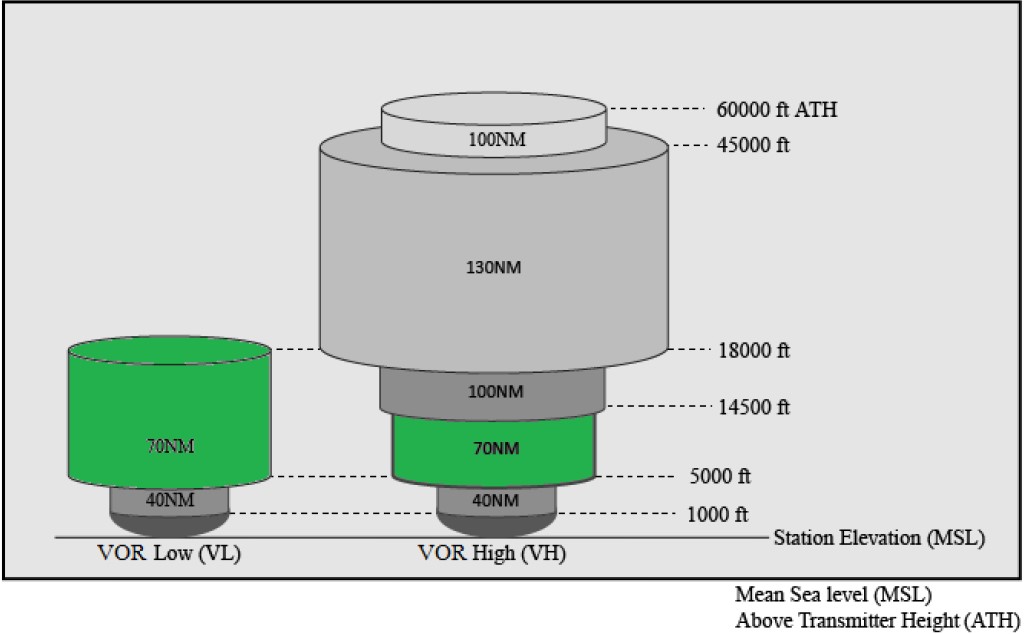
To re-purpose the CONUS VOR network from the primary means of navigation to a backup, the VOR signal must be available at 5,000 feet Above Ground Level (AGL). Coverage will exist below 5,000 ft, but may not be continuous. To provide the required coverage, new VOR Standard Service Volumes (SSVs) were established.
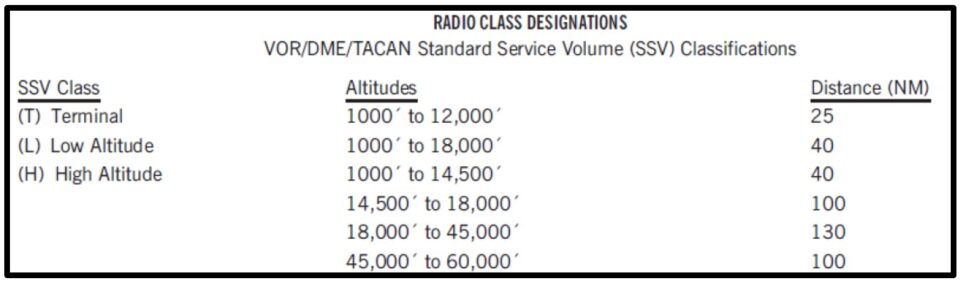
Remember these previous Standard Service Volumes?
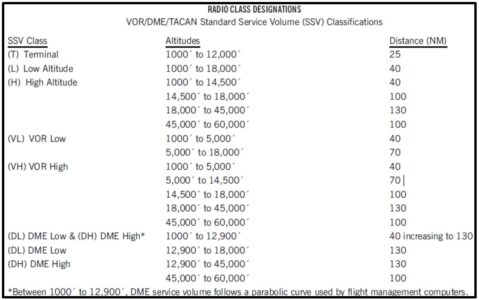
Below are the Current Standard Service Volumes
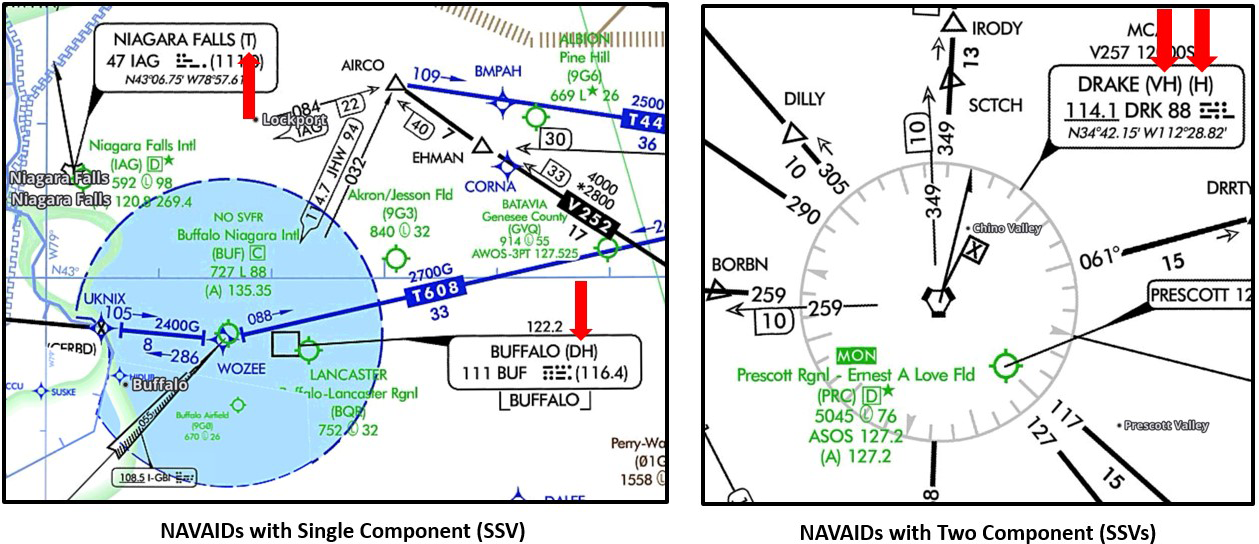
NAVAIDs with a single component SSV (VOR, DME, TACAN, NDB, NDB/DME) classification depict the name of the NAVAID first, then the classification of the SSV in parentheses next on the IFR Low Chart.
NAVAIDs with two-component SSV (VOR/DME, VORTAC) classifications depict the name of the NAVAID first, then the classification of the two SSVs in parentheses for each component on the IFR Low Chart. The VOR SSV is shown in the first set of parentheses, followed by the DME or TACAN SSV in the second set of parentheses.
New VOR Standard Service Volumes
MON VORs will be flight-inspected, and their class codes changed to the new SSVs. To Date, the majority of the 499 new VOR SSVs have been published.
VORs that do not meet the VOR MON criteria are targeted for discontinuance. To Date, just over half of the 303 VORs have been discontinued.
- Original plan: The FAA planned to decommission 470 VORs between 2014 and 2020.
- As of February 2022: The FAA had decommissioned 117 VORs.
- By 2025: The FAA plans to decommission about 35% of VORs in the contiguous United States (CONUS).
- By 2030: The FAA plans to reduce the number of VOR stations in CONUS to 580.
During a GPS disruption in the CONUS, the MON will enable aircraft to navigate through the affected area or to a safe landing at a MON airport without reliance on GPS.
During a GPS interference:
- Pilots can tune and identify a VOR at or above 5,000 feet AGL and
- Navigate VOR-to-VOR or along airways through the interference, or
- Navigate to an airport within 100 nautical miles to fly an Instrument Landing System (ILS), Localizer (LOC), or a VOR approach.
- Distance Measuring Equipment (DME), Automatic Direction Finder (ADF), surveillance, and GPS will not be required for the approach.
At least one conventional approach will be available within 100 nautical miles (NM) at designated MON airports.
What are MON Airports?
The Federal Aviation Administration (FAA) has designated certain airports as MON airports as part of its plan to modernize the NAS and ensure the safety and efficiency of air travel. MON airports are strategically selected airports that maintain specific navigation and approach capabilities to support aircraft operations during GPS disruptions. The FAA considers several factors when designating MON airports, including:
- Location: Airports are strategically located throughout the country to ensure adequate coverage and accessibility.
- Airport Infrastructure: The airport must have the necessary infrastructure to support instrument approaches, such as runway lighting and communication systems.
- Air Traffic Density: Airports with higher air traffic volumes are more likely to be designated as MON airports.
These airports have instrument approach procedures that are not reliant on GPS technology, such as ILS, LOC, and VOR Approaches. Users can navigate through an interference event or land at a MON Airport without GPS, DME, ADF, or Surveillance. By providing a reliable backup navigation system, MON airports help mitigate the risks associated with GPS disruptions and maintain the continuity of air traffic operations. Users without GPS can still operate in the NAS, but likely with reduced efficiency. There are no changes to current equipment or flight plan filing requirements.
How Can I Find a List of MON Airports?
The FAA publishes a list of MON airports in the Chart Supplement (formerly known as the Airport/Facility Directory). This publication is available in both printed and digital formats. You can also find information about MON airports through various online resources, such as FAA websites and aviation publications.
The IFR Low Chart depicts the MON airports with green “MON” text.
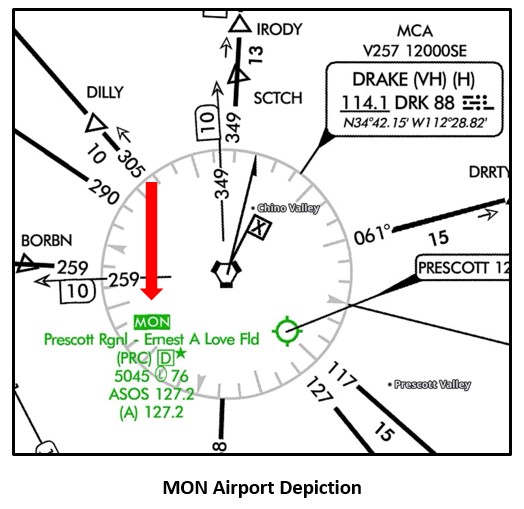
- Pilots are responsible for familiarizing themselves with the MON airports and their approach procedures.
- The FAA encourages pilots to utilize all available navigation resources, including GPS and ground-based systems, to maintain situational awareness and ensure safe flight operations.
Stay in the Know
The King Air is a very capable aircraft. It allows us to fly during the day, night, VFR, IFR, and in icing conditions. GPS use is commonplace when flying in the King Air and is a reliable tool. Loading an IFR flight plan into the GPS Navigation unit is second-hand to us. Often, “Cleared direct to…” after takeoff is heard from the controller. It seems like flying “direct to” is the only way we fly now. This can lead to some dependency on GPS and complacency of convention navigation. What happens when the GPS suddenly gives you a message “LOI” (Loss of Integrity) and or “DR” (Dead Reckoning)? Now what?
Knowing that the FAA has a backup to GPS in the form of the VOR Minimum Operational Network (MON), how do we stay proficient with conventional navigation, utilizing VOR’s, ILS’s, and LOC’s if we lose GPS?
One way to keep conventional navigation at the front of mind is to periodically file an IFR flight plan using Victor Airways. In the note section of the flight plan, state that you would like to remain on the filed route, no shortcuts. After loading the flight plan into the GPS navigation unit, review it, and take note of any VOR’s on your route of flight. Set up your NAV radios with the pertinent ground-based NAVAIDs for that flight. Try to keep up with the NAV frequency changes enroute. If you can display a bearing pointer, use it to verify the VOR course. It is interesting to see the difference between the GPS and VOR courses. When the controller gives you a clearance “direct to…”, you can reply that you would like to stay on the filed route. If you don’t have a bearing pointer, try navigating using VOR’s only. Obviously, this would be a flight where you were not in a hurry to arrive at your destination.
I have experienced the dreaded “LOI” and or “DR” messages. There was the instance of panic at first, but then the relief of knowing that I was already set up with the VOR’s in the background. I continued to use the VORs almost seamlessly. I didn’t have to scramble to find the proper VOR’s, frequencies, or courses. Since I had been keeping up with the flight, situational awareness was already there. I was lucky the outage happened while I was on a Victor Airway.
As VORs are decommissioned, more Victor Airways are disappearing. They are being replaced with GPS-based RNAV (Area Navigation) routes called “T” routes (Low Altitude RNAV routes). The Jet routes are being replaced with “Q” routes (High Altitude RNAV routes). Remember, the MON system will retain enough conventional routes to cover GPS outages.
If my outage occurred during a flight when I was off airway, I would have had to request a vector, possibly to the nearest VOR. Maybe surveillance was out, I would now have to fly direct to a VOR and navigate using a Victor Airway from that point on. I may have had to shoot a VOR approach because the closest MON Airport with an ILS was too far away.
When was the last time you intercepted and tracked a VOR radial, entered a holding pattern without the GPS, or shot a VOR approach not using GPS? Asking your training provider to cover some of these topics in your next recurrent visit is another good way to stay proficient with conventional navigation.
The FAA’s plan to reduce ground-based navigation equipment is happening now. The MON system and our training in conventional navigation provide the knowledge, confidence, and reassurance needed to navigate our King Air in the event of a GPS disruption.
Pressurization: Setting the Controller vs. Verifying the Results - by Tom Clements
The typical Normal Procedures King Air checklist addresses Pressurization four times. Before I discuss them, give yourself a pop quiz: Can you state in what ground or flight phase the “Pressurization” Challenge is listed and what your Response should be in each case? Take your time; I’ll wait.
Ready to compare your answers to mine? The first reference is in the Before Takeoff phase, in which you are directed to set the pressurization controller for the proper cabin altitude based on our anticipated flight. The second reference is in the After Takeoff (sometimes labeled Climb) phase, where there is a rather cryptic “Pressurization – CHECK” listed. The third mention is in the Descent phase, where we set the controller for landing. (I usually do this as the last step in the Cruise procedure, as discussed in my book.) Finally, the fourth mention – again, that overly-simple “Pressurization – CHECK” statement – appears in the Before Landing phase.
If you have been reading these monthly ramblings in order, you know that my blurb last month emphasized the difference between Controls and Indicators…that just because a flap switch gets moved, there is no guarantee that the flaps actually went to the position you were expecting. The technique I preached was to never let go of the control until the indicator shows visual confirmation of the status.
This technique does not work with the pressurization controller since it would require much of our climbs and descents to be one-handed, while we kept the other hand on the controller! However, the idea is the same: Just because we dial a certain cabin altitude and climb or descent rate into the pressurization controller, that control operation provides absolutely zero guarantees that the cabin will be doing what it should.
Here’s what those two “Pressurization – CHECK” checklist steps actually mean. I observe too many pilots responding to that step by looking at the controller to verify that it is set properly. No! You’ve already done that. Instead, your eyes need to be directed at the two pressurization indicators, the cabin’s Vertical Velocity Indicator and the combined cabin Altitude and Differential Pressure gauge!
There are lots of reasons why the pressurization system may not be working properly. Bleed air may not be turned on, the control switch may be in Dump, the airplane has so many air leaks that it is a flying sieve, your power setting in the descent is too low, the Pre-set solenoid is not working…these are some potential reasons why the expected result is not taking place.
For the “Pressurization – CHECK” step that occurs after takeoff, I suggest your first observation should be of the Differential Pressure gauge’s needle since if it is at zero you’re nor pressurizing at all. Because the pressurization controller is merely a governor for cabin altitude, the second observation should be of the cabin Altitude needle. It either needs to be already pointing to the altitude that you dialed into the controller or on its way up or down to get there. Lastly, if the cabin is now changing its altitude, observe the climb or descent rate and adjust the Rate knob as necessary.
For the “Pressurization – CHECK” step that occurs before landing, verify that the cabin Altitude needle is pointing close to the landing field’s elevation, in accordance with what you’d dialed into the controller when or before the descent began. Also, knowing that a 1 psid Differential Pressure value, at low altitudes, means that the cabin is about 2,000 feet below the airplane, if you are coming up on the Outer Marker or traffic pattern altitude, you need to be seeing less than 0.5 psid.
It is very embarrassing to decide to divert to Flagstaff with the controller still set for your originally-intended landing site of Phoenix. Unless you observe that the cabin is about 6,000 feet lower than Flagstaff and correct it promptly, you’re going to give your passengers a sinus-clearing experience at touchdown!
Post Maintenance Flight - by Zach Cleaver
Everybody’s most dreaded flight. This is the flight on which you will have confidence that your plane is working flawlessly, right? It just came out of maintenance; you have picked the best, most qualified shop to do the work on your aircraft. You’re excited to get in the air again! You jump in, fire up, and launch into the sky, and now is when you realize something is not quite right.
Unfortunately, this happens all too often. Picking up a plane from maintenance is one of the more challenging and dangerous flights you can make. We expect everything to be perfect. We expect everything to be as we left it when dropping the plane off. Reality is that’s just not the case. Mechanics are humans and occasionally make mistakes just like pilots do. In the flying game, mistakes can turn deadly very quickly. What can we do to reduce our chances of having an incident or accident? Let’s talk about it.
The first thing you can do is plan to take longer than you think it will. It is not uncommon to find multiple squawks coming out of maintenance. It’s great when we don’t, but don’t expect the plane to be perfect the first time you look at it. Next, assume everything has been changed in the plane, friction locks, trim positions, flap settings, seat position, etc. Check everything, even if it was not part of what was being worked on, it might have been bumped or changed accidentally. After that, pull out the factory checklist and go through the factory preflight line by line. Yes, this will take time, yes, you still need to do it.
What are some items that need a little extra attention during your preflight? Starting at the cabin door:
- The door seal: Pay close attention to the inflation tube at the base of the door as well as the top of the door frame. Passengers kick or drag bags across it frequently.
- Flaps: When retracted, they should have a small amount of play in them. If they are tight, they will need to be adjusted.
- Exhaust stacks: Give them a knock with your knuckle, listen to the sound, and learn what each sounds like. If a crack develops, the sound will change.
- Nacelle cowlings: The top forward cowl is held down by a cam system. Occasionally, the cam fails to engage the hook side, preventing the cowl from being snug and held down. Thump the cowl in an upward motion with the heel of your hand to make sure it is secure. If your paint scheme has stripes that flow over the nacelle, it is easy to see when the stripes don’t line up. If you do have a cowl come loose during flight, open the ice vanes, and it will help suck the cowl back down until you land.
- Nose gear: Two things to check here. The stop block on the aft portion of the strut. Make sure it is straight! If your plane was towed and the turn limits exceeded, it will be bent and need to be checked out by a mechanic. The other item to check is the shock link spring clip. If this clip fails and falls out, the spring in the shock link will expand, pushing your nose wheel into a right turn. You will not be able to use your rudder pedals to straighten the plane out.
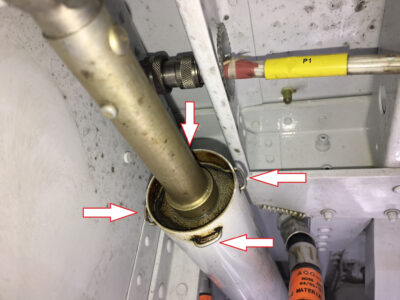
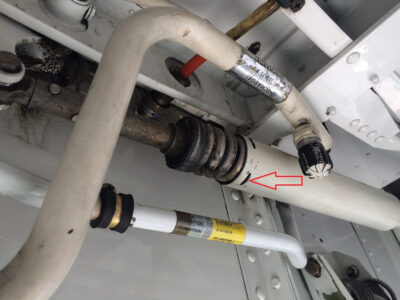
- If your plane is coming out of the paint shop, pay extra attention to your control surfaces, which were removed for painting. Check all of your required placards. The full list is in your aircraft’s POH. On the C90 Series and E90s, check the trim markings on your elevator. Here is what they should look like when the trim is set to zero.
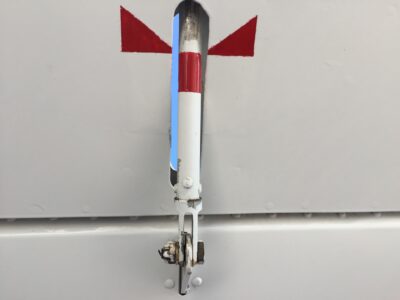
CORRECT
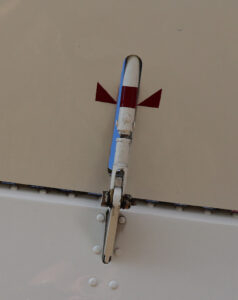
INCORRECT
- Check the static ports on both sides of the fuselage. We have seen reports of tape left covering the ports after painting or after washing. Congratulations, you have completed the interior and exterior preflight without finding any issues! Now is the time to start up taxi to the runup area and do a full runup. You were going to do the full run-up, right?
Congratulations, you have completed the interior and exterior preflight without finding any issues! Now is the time to start up taxi to the runup area and do a full runup. You were going to do the full run-up, right?
Before you start, do the fuel panel test if you haven’t already. It can be completed with just battery power and is quick to do. It is not uncommon to find firewall valves that stick open or do not seal properly.
Things to look for during run up:
- Minimum prop RPM: For all four-bladed props on King Airs, there is a minimum prop RPM. Make sure you are idling above the appropriate number for your aircraft. If you are below that limit, you could experience reactionless vibration (the prop blades flexing in opposite directions; you will not feel this in the plane). This will damage your prop hub and require prop and blade replacement.
- Overspeed Governor Check: When performing this check, there are two things to watch out for. The first is move the test switch into the test position while your prop is under the test RPM for your prop. If your prop RPM is above the test RPM setting, it will come down very quickly! The other is that the prop is in the proper RPM range.
- Autofeather check: Pay close attention to the torque reading when the autofeather lights illuminate. Remember, the 400 ft-lb and 200 ft-lb sensors are not as accurate as your torque gauge. It is not uncommon to see the autofeather lights illuminate as high as 500 ft-lbs. Watch when the opposite autofeather light extinguishes as power is reduced. The autofeather system has proven to be very reliable, but make sure it is working the way it’s supposed to.
- Rudder Boost: This will take lots of power to activate on the ground. On a hot, high-density altitude day, it might be impossible to check activation without exceeding engine limitations.
- Pressurization Test: The most common mistake seen here is not opening the bleed valves. Moving your condition levers to high idle will speed up the test. Remember to confirm the test switch is back in the PRESS position after completing the test.
You should have done this already during the interior pre-flight. Here is another chance to verify your trim settings and friction locks. Some King Airs are known to have Power Lever Migration (PLM) issues. If this happens during takeoff, the lack of speed and altitude makes it difficult to recover from. Take a look at accidents in Wichita, Tucson, and Addison as examples of possible PLM-related accidents. Unfortunately, the post-accident fire destroyed evidence of PLM, but all three have hallmarks of it occurring just after takeoff.
The first flight after maintenance will always be challenging! Make the flight as safe as you can by being thorough in your preflight and run-up. Fly Safe!
Engine Failure! - by Zach Cleaver
“Oh $#@!!….
The thought that goes through every pilot’s head when they have an engine problem. Engine failures are among the most feared emergencies in aviation; that said, they don’t have to be. With some preparation and training, we can take the fear out of failure and remember to fly the plane.
When we first start flying multi-engine airplanes, we are taught a version of:
“Mixtures-Props-Throttles-Identify-Verify-Feather”
This works well in piston-powered planes. In King Airs, we modify it a little:
“Power, Props, Flaps, Gear”
For those of you who have followed Tom Clements’s teaching, this should sound familiar. It is also known as “Your Four Friends”! It is the place to start when you have a suspected engine failure on your hands!
POWER: Push both power levers forward until you are making maximum power. Respect your ITT and torque limitations!
PROPS: Both prop levers go full forward. Our props are more efficient at high RPMs with low airspeed. We want to get the most performance out of our remaining engine, and this helps!
FLAPS: Getting rid of drag helps maintain speed. Retracting flaps will help here. If in doubt, bring your flaps up.
GEAR: Another drag reduction. When in doubt, retract the gear!
Let’s talk about putting this into practice. We train to improve our skills and stay proficient. The safest place to do this is a simulator. It allows us to practice failures at the worst possible moment, low to the ground and slow, and repeat them until we get it right and continue to get them right. The downside of using a simulator is that we know it is not real. We know, even if we make a mistake, we can reset and try again. If we train in the aircraft, certain tasks should not be performed because the safety margin is too small. However, practicing engine-out emergencies in the aircraft at a safe altitude can be very beneficial to your understanding of the aircraft and your response to the emergency.
The reason aircraft training can be so beneficial for King Airs can be summed up in the phrase “If you have flown one King Air, you have flown exactly one King Air!” There are so many models, along with all the avionics possibilities, engine differences, and other modifications to the fleet; they really are all different. This is where getting expert training on your specific aircraft, with a focus on its equipment, can be highly beneficial.
Getting back to single-engine training. Having an understanding of your aircraft, how it behaves, and its capabilities while single-engine is very important. The only real way to find out what your airplane’s characteristics are is to actually go do aircraft training. We can read all the manuals and do all the practice in the simulator, but it will never replace actually doing it in the plane.
When I get ready to do single-engine training in the aircraft, there is a brief that covers what we are going to do, what the pilot’s responsibilities are, and what the instructor’s responsibilities are. We cover what altitudes we will be at, what the minimum altitudes (5,000 AGL) will be, and options on what airports are nearby. We cover procedures and memory items. All of this is done before leaving the ground.
Once we are in the air and in the practice area, we usually start off with some basic maneuvers, steep turns, stalls, etc. I find that it is a good warm-up for what is to come. After we complete our maneuvers, it is time to perform the in-flight engine shutdown. We do a quick recap of what is going to happen, ensure we are at a safe altitude, and verify we are close to an acceptable runway if needed.
I start by framing the “failure” as a worst-case scenario. Rudder boost will be turned off initially, and the engine will be “failed” in such a way that auto feather is not activated. What I aim to demonstrate is that the aircraft will remain controllable under the worst-case scenario as long as we, as pilots, do our job. You do not need to react quickly, but you do need to react appropriately.
As we go through the engine failure procedure, we discuss how the aircraft is handling under various conditions. We discuss how much trim is needed, how banking into the good engine affects performance, the changes adding rudder boost back in make, and how feathering the prop changes performance. Time is spent on single-engine performance and what your plane is capable of. Will it climb? What speed will it cruise at? How do configuration changes affect performance?
The change in pilot confidence I see is remarkable, especially among pilots transitioning from piston twins to turbines. I regularly see a pilot who is terrified of having an engine failure change to a pilot who knows they can handle the emergency. The only way for them to experience this is through aircraft training. With the differences among King Air models, training in YOUR aircraft is the way to go!
Landing Approach Speed - by Tom Clements
In the POH’s Landing Distance charts there is a table that lists “Approach Speed” as a function of landing weight. The heavier the weight, the faster the speed. Since the landing comes at the end of the approach, some pilots, understandably, are unsure as to exactly what this speed is and when it applies. Some believe that the entire approach, perhaps from the outer marker inbound, should be flown at this speed. No, not usually.
The use of the term VREF seems quite common nowadays. Although originating in the certification rules for Transport Category airplanes, it has been adopted by both manufacturers and operators of light planes. VREF, Reference Speed, is simply 30 percent above stall speed, or 1.3 x Vs. That is exactly what Beech’s Approach Speed is, nothing more or less than 1.3 x Vs. So, in this context, Approach Speed and VREF are identical, one and the same.
Lately, there has been a bit of a flap – pardon the pun – in some training organizations coming from the move to prohibit or forbid landings in which Approach flaps are used, not full flaps or no flaps. You see, the argument goes, Beech publishes data for full and no flap landings but nothing for approach flaps, so it must be a no-no.
Really? Really?! Folks, I ran the Beechcraft Factory Training Center in Wichita back in the 1970s and we advocated and practiced plenty of approach flap landings. Specifically, this was the preferred configuration for single-engine landings and for low ceiling and visibility ILSs in which the runway did not come into view until under 500 feet above touchdown. Since the POH did not present landing distances based on approach flaps, we calculated the no-flap distance and merely made the logical assumption that the approach flap landing distance would not be longer, since the applicable VREF speeds were lower.
Of course, there are exceptions to every rule and if the runway for the single-engine or low ILS landing was not long enough to accommodate the choice of approach flaps, then we’d need to find a different runway or go ahead and use full flaps, even though it was not the preferred choice.
And why is an approach flap landing preferred in these two cases?
In the case of the low ILS, selecting full flaps close to the runway does two undesirable things. First, it destabilizes the approach, giving a ballooning tendency and a need for trim and sight picture changes. Second, it exposes the airplane to a split flap situation uncomfortably close to touchdown, with little time to recognize and respond to the situation.
In the case of the one-engine-inoperative landing, Beech makes it clear that the selection of full flaps cancels the go-around option. Granted, why would we ever choose to make a single-engine go-around? With proper runway and weather selections, the need for that maneuver should be exceedingly low. But, on the other hand, when the Airbus we’d been following blew a couple of tires, stopping on and blocking the runway, wouldn’t it be nice to do an uneventful go-around and either use another runway or even another airport? However, if we’d already gone to full flaps, then we’d better land in the grass or on a taxiway beside the blocked runway.
Let’s get back to our discussion of the landing distance chart’s Approach Speed table. In the Associated Conditions presented on the chart, a sink rate or descent angle is specified at the threshold crossing height, the standard fifty feet Height Above Touchdown (HAT). The combination of configuration, power, speed, sink rate, height above the threshold, and braking and/or propeller reversing activity are the variables that determine the charted landing distance. If we are remiss in “nailing” any of these, then the distance will be off by some amount. And isn’t it somewhat laughable that “Maximum Braking” is always specified?! Unless your flight department has an unlimited tire and brake replacement fund, I’ll wager few of us have ever, ever, used “Maximum Braking.”
So Approach Speed or VREF is the speed at fifty feet above touchdown. How we establish that speed is usually different from pilot to pilot. A Bob Hoover could probably do an engine-out four-point roll on final and still nail VREF perfectly at the appropriate point. As for me, I’m going to need a little extra time to get established and stabilized. That’s why I’ll select landing flaps no later than 500 feet HAT and then bleed off speed and re-trim so as to be stable at VREF at the threshold. Thus, my actual speed on final approach to landing is above VREF until the very end, the last 100 feet or so. We turboprop pilots have some flexibility that the jet-jocks lack. Their need to be fully configured and stabilized for at least the last 500 feet does not apply with our thrust-responsive and drag-responsive propellers.
Although difficult for some to accept and do, one of the basics of the landing distance testing is that power is at idle from the fifty-foot threshold point to touchdown. Given that fact and the need for a flare before touchdown, the actual touchdown point is close to 1,000 feet past the fifty-foot height mark and the touchdown speed is typically ten to fifteen knots below VREF. Since the touchdown speed is virtually impossible to accurately control, it is never posted in the POH.
Although various rules-of-thumb exist for how much VREF should be adjusted when using approach flaps for landing, how can we find the exact number to use for our various landing weights? We do it exactly the same way that the Beech flight test engineers determined the flaps 0% and flaps 100% VREF speeds. It may take an hour or so, maximum, but it is a worthwhile exercise. (Unless your training provider already has done the work and published the speeds for you.)
Here’s what you do: First, go to the stall speed chart in the POH and determine approach flap VS for the same weights used for full and no flaps. Notice that the speeds here are presented as Calibrated Airspeeds, CAS. Second, multiply the speeds you have found by 1.3. Third, now go to the Airspeed Calibration chart in the POH and convert the CAS values you have calculated to IAS values, making sure you use the line for Approach flaps. Round your answers to the nearest knot. Bingo! Now you have the exact VREFs to use for the rather-rare approach flap landing.
Move Your Hand Away from that Start Switch! - by Tom Clements
Why is your hand hovering over the “Ignition and Engine Start” switch after you’ve placed it in the Up position?! It has better things to do, such as pointing at expected annunciator lights or even scratching an itch. There is absolutely no reason to keep it near the start switch!
“But why not?!” Because, if you accidentally turn the start switch off too soon, well before 50% N1 is achieved, you will be the cause of your aborted start due to ITT getting too hot!
“But, Tom, there are starter time limits to be observed. I want to get the switch off as soon as I safely can so as to abide by those limits!” No, you are operating under a common misconception here. Those starter time limits were established based on the worst-case scenario of heat creation in the starter-generator when it alone was driving the engine’s compressor section. Once exhaust gases begin to flow and their impact on the compressor turbine contribute to compressor rotation, those time limits are meaningless. As you should know, you can turn one start switch back on after the engine is running normally and the only thing that happens is the generator cuts off…no big deal whatsoever and no time limits in effect.
If we ever forget to turn the start switch off after the engine has reached Low or High Idle speed, the only problem caused is that the generator will not operate. (Been there, done that, haven’t you? Yes, we are all guilty of that insignificant booboo.)
“Yeah, but…”
The “but” is usually based on the perceived need to move the starter switch from the Up to the Down position in the event of a hot start. The POH’s checklist, after all, calls for using the bottom, “Starter Only,” position to motorize and cool down the engine in the event of excessive ITT experienced during the start sequence. This step, however, only comes after the condition lever has been pulled back into the Fuel Cutoff position.
I ask you, “What difference does it make if Ignition is on or off if there is no fuel to be ignited?”
My point here is that, in the rare event of a hot start, cutting off the fuel with the condition lever is paramount. The next important step is to keep the compressor rotating to blow cooling airflow through the engine. Well, friends, the starter switch in the Up position does just as good of a job at that task as it does in the Down position. The presence or absence of ignition is immaterial at this point. Also, keep in mind that it is easy to forget that the starter switch must be held down to the bottom position, that it will not remain there without pilot action…unlike the top position. So a common mistake is that pilots will move the switch from Up to Down, release it, and then realize, due to rising ITT, that they need to keep pressing it down to ensure continued starter operation.
My argument is this: Since leaving the starter on too long is not a problem at all – it only prevents generator operation – yet turning it off too soon can lead to a hot start, then leave it on until the engine has totally stabilized at the desired idle speed as selected by the condition lever’s position. Only then, with stabilized N1, return your hand to the starter switch to move it from the Up to the Center position. And in that exceedingly rare case of an ITT runaway – probably due to a weak battery or a bad starter motor – only consider moving the starter switch from Up to Down – and keeping the pressure on it to keep it activated – well after you’ve terminated the start by use of the condition lever.
Get it? Got it? Good!
Who is this Fuel Topping Governor and why was he put in charge? by Pete Marx
Many people have the same questions. What does the Fuel Topping Governor really do for us, and is it really needed?
The King Air has three propeller governors. The Primary Propeller Governor (PPG), the Overspeed Propeller Governor (OSG), and the Fuel Topping Governor (FTG). The FTG is located in the same housing as the PPG. This combined unit is technically called the Constant Speed Unit (CSU). This term, “Constant Speed Unit,” is used less frequently. Most people use the terms “Primary Governor” and “Fuel Topping Governor” separately. All three governors can control propeller speed under certain conditions.
We have all been taught: if the PPG fails and the propeller (prop) speed reaches the OSG speed, the OSG will limit the exceedance. If neither of the two governors (PPG or the OSG) can slow the prop down by using oil pressure when the prop continues to exceed limits, the FTG will cause the fuel control unit to slow the engine down, which in turn slows down the prop.
Figure 1 represents a typical B200 King Air propeller rpm range. The prop lever is shown at the bottom of the chart. By pushing the propeller lever full forward, we are asking the PPG to adjust the blade angle to achieve a prop rpm of 2000 rpm. If the rpm exceeds 2000 rpm, the OSG will try to adjust the blade angle to maintain 2080 rpm. If OSG cannot stop the rpm exceedance, then the FTG slows the engine down to maintain the prop rpm no faster than 2120 rpm.
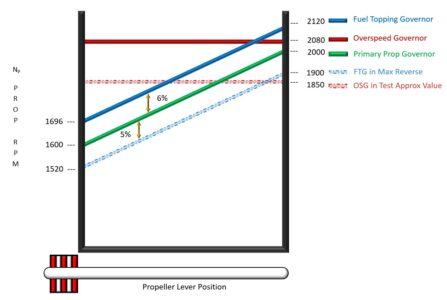
Let’s say the prop lever is pulled back to 1700 rpm, and the PPG fails to maintain the 1700 rpm setting. Which governor will stop the exceedance first: the OSG or the FTG? Looking at the chart, you can see that FTG is the answer. This is because the FTG limit is linked to the selected rpm set by the pilot using the prop lever. The FTG will limit the prop rpm to 6% above the selected 1700 prop rpm setting. If you are cruising at 1700 rpm and the propeller overspeeds, the FTG will stop the exceedance at 1802 rpm. This is well below the OSG’s fixed limit of 2080 rpm. The answer to the original question once again is that the FTG will limit the rpm prior to the OSG.
What I have been describing is mostly academic, given the extreme reliability of the PPG and the OSG. I have never heard of either the PPG or OSG failing. One could think of the FTG as being “parked” at 6% above the PPG rpm setting during normal operations.
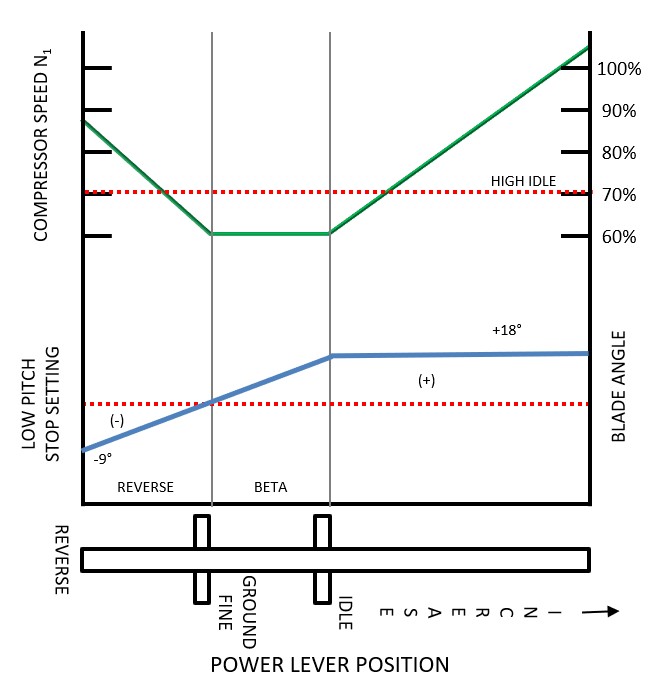
Let’s talk about Reverse. What happens to power and prop rpm during Reverse operations? How is the FTG involved? In Figure 2, as the power lever is pulled back from the high-power setting to idle, the Compressor Speed (N1) slows to the idle speed set by the condition lever. Let’s assume the condition lever is at low idle. When the power lever is reduced to idle, the N1 will be approximately 62%. If the condition lever was at High Idle when the power lever was reduced to idle, the N1 would be approximately 71%. As we lift the power lever over the gate into Beta Range and continue aft, the N1 speed remains the same. However, the prop blade angle will now decrease toward zero. As we continue to move the power lever into Reverse, the blade angle goes negative, and power increases. Why increase power? In Reverse, we want more power so we get more “thrust” pushing forward, causing the aircraft to slow down faster.
Did you see that squirrel? Now for a short side track. This paragraph will become relevant shortly, so please bear with me. We are on the ramp in our B200 King Air, just after both engines have started. Our power levers are at idle, prop levers are full forward, and the condition levers are at low idle. With the prop levers full forward, what prop rpm are we asking for? 2000 rpm (For the B200 with -42 engines, 4-bladed props). Are we getting what we are asking for? 2000 rpm? Nope. The RPM is likely just above 1180. Why are we not getting 2000 rpm? Most of you will say, “We need to add power.” You are correct. Why do we need to add power? What’s wrong with the PPG? We selected 2000 rpm with the prop lever! Why doesn’t the PPG adjust the blade angle to make less rotational resistance, causing the prop rpm to increase? Those of you who said the Beta Valve is blocking oil from reaching the hub have the idea. The PPG is trying to send oil to the hub to lower the pitch so the rpm increases, but the Beta Valve is stopping the oil pressure to keep the blade at its lowest “safe” pitch, otherwise known as the Low Pitch Stop (LPS). Because the oil is effectively blocked, this makes it a “fixed pitch prop” for the time being. As we add power for takeoff, the prop rpm will increase, even though the blade angle is not changing. We are spinning that “fixed pitch prop” faster with power. Once the prop rpm gets to 2000 rpm, the PPG is now able to control the blade angle. As we add more power, the prop rpm wants to increase. However, to maintain 2000 rpm while power is being increased, the PPG allows oil to be pushed back into the engine casing. The prop blade moves toward feather. This will cause a “bigger Bite” of air, resulting in larger rotational resistance and slower rpm. What’s the point? As we add power, the PPG will start controlling the prop at 2000 RPM by increasing the blade angle to a MORE POSITIVE angle to maintain the 2000 RPM. Remember this point for the following paragraph.
The squirrel is gone; it’s time to focus. Back to Figure 2. Looking at the reverse section, when the power lever is moved into reverse, the blade angle goes negative, and the N1 increases. What would happen if the engine power spun up the prop speed in reverse to 2000 rpm? What would the PPG do? Remember the point we discussed in the previous paragraph: the PPG would result in a more positive bite. A more positive bite? Why? The only “tool” the PPG has to slow the prop down is to take a “Bigger Bite”. The blade angle would come out of full reverse, from about -9 degrees, speeding up greatly while passing through the smaller negative blade angles (less rotational resistance) toward zero, then going positive. The thrust would go from a large negative to a large positive. Hang on for a wild ride! What a mess! We oversped the props greatly, and I don’t even want to guess what happened to directional control.
How did the designers of the King Air solve for this potential problem? See Figure 2, when in full Reverse, the N1 is limited to a maximum of approximately 88%. This 88% N1 equates to a prop rpm of about 1900, which is below the maximum PPG speed of 2000 rpm. If the prop rpm never reaches the PPG setting, the PPG will never try to increase the blade angle. Problem solved! How do we limit the N1 speed? This is the Fuel Topping Governors’ (FTG) purpose. The FTG’s job is to limit the N1 to a speed that results in a prop rpm that is 5% below whatever the PPG prop rpm setting is during Reverse. This will prevent the PPG from taking over and dumping oil out of the hub, causing a bigger bite. See figure 1. The FTG is the key to making the reverse happen safely. Sounds like that Fuel Topping Governor is pretty handy.
But wait, there’s more! Let’s say we land with the prop levers not full forward. The prop rpm is set for 1700, and we use full Reverse; what happens? The FTG will restrict the N1 to a speed that results in a prop rpm of 1615. This is 5% below 1700 rpm. Are we getting our maximum Reverse? No. The engine and prop are not as fast as they could be if the prop were fully forward. Less power… less performance.
What does the “REVERSE NOT READY” light on the annunciator panel mean to you as a pilot? We know the light will illuminate if the prop levers are not forward and the gear is down. To me, it means I will not be able to get maximum performance if I need it for Reverse. Hmm, making sure the props are forward for max performance landings sounds important.
I know many of you are wondering, won’t I damage the prop linkages if I go into Reverse when the props are not forward? The answer depends on your speed, but yes, there is a potential for damage.
I move my flap lever from the “UP” position to the “Approach” position. Nothing happens. Ugh… a no-flap landing is in my future. No problem, just follow the checklist. Okay, it looks like on my B200 flaps-up landing, Vref is 132 KIAS. Ill pick an approach speed of 140 KIAS and plan Vref of 132 KIAS at 50 feet AGL. As soon as I land, I throw the power levers into Reverse…hmm, something doesn’t feel right. At 132 KIAS, the prop is windmilling so fast that the PPG has to increase the blade angle to keep the prop rpm at 2000 RPM. The prop angle is above the LPS. The PPG is still controlling the prop. In other words, it is still “on the Governor”. The Prop needs to be sitting on the low pitch stop, “Off the Governor”, in order for the prop angle to continue to decrease further when pulling the power levers back through the BETA range and into Reverse. If the prop is still “on the Governor” when pulling the power lever back, all you will do is bend/damage the linkage.
The bottom line is that you will need to be below about 110 KIAS before the blade will start to rest on the LPS. If your prop levers are not full forward, let’s say they are set for 1700 rpm, then you will need to slow to around 95 kts to get “off the governor” in order to be able pull the power levers into Reverse without damaging linkage. When you plan to use Reverse for landing, having the prop levers full forward will make you more certain you will be able to get into Beta Range than Reverse without damage.
Phew, that’s a lot. What have we learned? The PPG and OSG are extremely dependable. Given the low risk of both governors failing, it is not necessary to add a third governor (FTG) for overspeed protection. However, it IS VERY necessary for our friend the Fuel Topping Governor to be there for us in Reverse. Knowing that the Fuel Topping Governor is there for us in the background is a great feeling.
Can I Backup My King Air? - by Tom Clements
Most all of us have been there. We have maneuvered into a particularly tight space on the ramp – either due to the lineman’s directions or to our own sense of necessity – and now find the need to extradite ourselves from this predicament. Problem is, there is not enough space to roll forward and make the turn. We need to back up. Can we?
“Of course not, you idiot! The POH says that you cannot be in Reverse below 40 knots. Since you’re starting from a stopped condition, it’s not an option!”
Not so fast, Mr. By-the-book! Let’s say that, instead of a mistake on a commercial ramp, we’re in a war zone and an incoming mortar just cratered our expected taxi route. If we don’t get to the runway right away, we’ll be trapped for the night and unlikely to survive to the dawn. Yet if we back up, we can get to the runway. What now?! Or, more realistically, if we wait for the FBO’s tug, we’ll lose our departure time slot reservation and not make it to that meeting where the possibility of a multi-million dollar contract awaits. Again, what now?!
The easy and correct answer is to shut down, find a tug no matter how long it takes, and push the airplane back to a spot from which only positive thrust will be required for maneuvering. And folks, if there is a tug available within a reasonable period of time, this is the only correct answer about how to handle the situation. In fact, if there is a tow bar available and enough people-power to push and pull, it is still the best approach.
Unfortunately, today neither option exists, no tug, no tow bar, no abundance of helpers. Now what?
The only realistic option is to use propeller reverse to back up your King Air. Should this ever be done? No! Can it be done? Yes. As Dirty Harry said in the movie, “Are you feeling lucky, punk?” If luck is on your side, you’ll do this and the engines, propellers, and airframe will suffer no harm whatsoever. If luck is not being a lady tonight, you may end up with a propeller nick, a dent in the nose caused by a propeller-flung pebble, and, possibly, even first stage compressor FOD. Are you feeling lucky, punk?
Let’s stack the deck in our favor so that luck favors us. First, what is the condition of the ramp? Only if it is paved and in relatively good condition will backing up likely yield no harm. Second, what’s behind us? It’s pointless to execute a flawless backup maneuver that protects our engines and propellers well, yet we ram our tail feathers into that Gulfstream that snuck in behind us!
The third item that stacks the deck in our favor is to extend the engine ice vanes, to turn on Engine Anti-Ice for the pitot-cowl-equipped airplanes. Whether this really adds much “stacked deck” in our favor is debatable. Why? Because the ice vane system is designed to be effective when airflow off the propeller is normal, moving aft. When we are in reverse and the propeller is pushing air forward, the ice vane system is no longer working in its optimal manner. However, if a piece of FOD gets sucked up past the cowling lip and the sucking action of the compressor tries to ingest it, the extension of the ice vane provides some additional level of protection.
The next item that will be beneficial here is to move both condition levers to High Idle before selecting Reverse. This gives us more baseline engine power and makes the changing thrust caused by blade angle changes more immediate. The N1 spool up factor is nearly eliminated so that blade angle changes take center stage.
Now, with ice vanes extended and the condition levers at High Idle, pick up both power levers and move them through Beta, up over Ground Fine (if applicable), and now gently release the brakes as you start feeling the negative thrust. Ah, there it is! We are starting to move backward and we find it is surprisingly easy to control the negative thrust by making minor forward and aft power lever movements. If we need to turn, the nose wheel steering is effective and works the same as when going forward. Namely, push left rudder pedal to make the airplane go left.
Here comes perhaps the most important point of this entire article: While rolling backward, do not use brakes to stop! Instead, move the power levers forward to stop the reverse travel and only then apply brakes!
If we stomp on the brakes while going in reverse, there is a strong tendency for the airplane to pivot about the main tires with the nose coming up as the tail comes down. More than one King Air has suffered extensive damage when it rocked onto its tail, sending the ventral fin or aft body strakes into the fuselage! This expensive mistake is easily avoided, however, by merely using positive propeller thrust to stop backward travel, not brakes.
Am I really advocating backing up your King Air using reverse thrust! No! Go back and re-read my comments about using a tug or people-power instead. Folks, this is a last-ditch emergency procedure with an unavoidable level of some risk. However, being realistic, if you fly a King Air long enough there will come a time or two that this maneuver is the solution to a lengthy delay or perhaps a canceled flight. Using the procedures discussed here – a relatively clean ramp, ice vanes extended, High Idle, never using brakes while rolling backward – may stack the deck favorably enough for you that no damage is incurred.
Auto-Ignition: Must We Arm It At Night Above 14,000 Feet? - by Tom Clements
The question was asked, “Why do some King Air POMs require us to arm Engine Auto-Ignition at night above 14,000 feet?”
I can explain that. I bet few folks remain who are aware of the history and reasons behind this.
Are you aware that the first King Airs did not have ice vanes? As strange as it sounds now, but the 65-90, “Straight 90,” used alcohol injection into the cowling inlet! It worked very well except when the alcohol ran out! I guess it was a good thing that bleed air was not yet used for pressurization, eh? Pilots may have gotten a contact high from breathing that alcohol-infused air! Also, there was no Auto-Ignition. Yes, the ignitors could be turned on manually via a set of switches, not via the Starter switch, but there was no tie-in to torque.
Due to the inconvenience of refilling the alcohol tank, one of the big improvements when the A90 got certificated was to replace the alcohol injection system with an inertial separator system…ice vanes. Do you happen to have access to a Straight 90 or A90 POM? If so, examine the drawing of the airplane on the cover sheet. What do you notice about the cowling? It is nice and sleek without any oil cooler scoop mounted below!
Originally, the oil cooler was located in the back of the cowling. The thinking was that any ice deflected by the vane would impact against the face of the oil cooler, melt, and harmlessly exit the cowling as water via the backside of the cooler. Test flights were successful and the new system got approved.
Then the first winter season rolled around – I guess that would be the winter of ’65 and ’66 – and many reports started reaching Beech of problems with engine ice protection. Compressors were being FODed, flameouts were reported, and in fact there was at least one case of a double engine flameout. Holy cow! What the heck was happening?! An intensive flight test program was started, including closed circuit TV cameras in the intake area. When the test pilots also experienced a double engine flameout, the culprit was found. Can you see what’s coming?
What had been overlooked was the fact that in very cold conditions the oil cooler would go into bypass mode with all oil bypassing the cooler. Thus, instead of the deflected ice melting and passing through as water, the oil cooler completely iced over and now everything went right into the engine inlet!
Two changes were forthcoming. First, the oil cooler was relocated to a new position in a separate scoop below the cowling, leaving the exit path behind the ice vane wide open. Second, in a few of the flameout cases the crew was not successful in affecting a relight because they failed to turn on the Ignitors. (“Damn! My Beech 18 would start just fine when fuel was reintroduced. What’s wrong with my King Air? Huh? You mean the fuel won’t initially ignite without ignitors on?!”) So the Auto-Ignition system was developed, allowing the ignitors to be armed, ready to automatically come on if and when torque dropped below about 400 ft-lbs.
Why the “14,000 feet at night” requirement? All of the flameout cases that were reported occurred at 16,000 feet or above. It probably took those colder temperatures at altitude to cause the oil cooler bypass condition. So, worried that the “visible moisture” may not be readily visible at night, the FAA slapped a 2,000-foot safety cushion on the AI arming requirement, moving it down to 14,000 feet.
As Paul Harvey used to say, “Now you know the rest of the story!”
Pressurization Controller – Read This Before You Replace It - by Pete Marx
There I was, shortly after takeoff, gear up, climbing out. While performing the After-Takeoff Checklist, I noticed that the cabin rate of climb matched the aircraft rate of climb. The cabin altitude was climbing with the aircraft altitude, hmmm. No, I didn’t forget to turn the Bleeds Air Valves on… this time. What gives?
To pressurize the cabin, we need air entering the cabin (Inflow) and a way for air to leave the cabin (Outflow).
A common characteristic of all King Airs is that they do not have a tight cabin. They tend to have high leak rates. Is this a concern? Not necessarily. Can the cabin maintain maximum differential when using only one Flow Control Unit and with both Bleed Air Valves open? Can I reduce the power back until I hear the gear warning horn without the cabin starting to climb? If the answer to both questions is yes, I am happy with my King Air. However, if the answers to the questions above are no, I may have one or two weak flow-control units (inflow) combined with an excessive leak rate (outflow), which is causing the pressurization problem. Too much outflow, not enough inflow. The vast majority of pressurization problems in the King Air result from inflow and/or outflow issues, not the pressurization controller itself.
The following discussion excludes King Air models with superchargers (straight 90, A90, or B90). We will discuss the rare pressurization problems that could exist even when the cabin is tight, and we have strong Flow Control Units.
First example of a rare malfunction is:
The Ejector Vacuum line becomes detached from the throat of the Ejector
The Normal Outflow valve and the Safety Outflow valve at the back of the cabin need a vacuum in order to open. If vacuum is lost due to the vacuum line disconnecting from the ejector, the internal spring wins and the outflow valves “fail” to the closed position. No more outflow! With the Bleeds Air Valves open, we are jamming air into a sealed container, otherwise known as the pressure vessel. If this occurred on take-off, your ears surely will feel it! High power setting, lots of inflow, and no outflow. I know, I’ll just dump the cabin, that should stop the cabin from diving to a lower altitude…. No change. The Safety Outflow valve needs a vacuum to open. With no vacuum, there is no dump mode. The cabin differential will increase like a balloon ready to pop. Looks like we need to stop the inflow. By turning off the Bleed Air valves, we can let our leaky King Air do what it does best, leak air out of the pressure vessel. This could take more than 20 minutes to fully depressurize.
The Preset Solenoid Failing Closed
The next malfunction concerns the Preset Solenoid. On most King Airs, prior to take-off, we normally set the Pressurization Controller to 1000ft above our cruise altitude. Today’s setting equated to a desired cabin of 8000ft.
Normally, the Preset Solenoid blocks the vacuum to the Normal outflow valve on the ground, preventing the controller from trying to drive the cabin to a higher altitude. This allows us to be able to set the Pressure Controller on the ground. Once the airplane leaves the ground, the Preset Solenoid opens, allowing vacuum to modulate the Normal Outflow valve. We see the cabin climbing at a slower rate than the aircraft, and the rate of climb can be controlled using the rate knob on the Pressure Controller.
With a failed Preset Solenoid in the open position, the Pressure Controller will try to drive the cabin to a higher altitude as the Controller is set during the Before Takeoff Checklist. The Normal Outflow valve would open (using vacuum) and would not start modulating until the aircraft reached the desired cabin altitude set in the controller. The cabin altitude is never permitted to be higher than the airplane altitude. If the cabin were higher than the aircraft, there would be a negative differential pressure inside the cabin. The outflow valves are designed to open if there is negative differential pressure inside the cabin to prevent damage to the pressure vessel. During this specific malfunction, the outflow valves will remain open until the aircraft’s altitude matches the desired cabin altitude. The result is that the airplane is essentially unpressurized during climb.
To recap, if the Preset Solenoid does not energize, due to a broken wire or a bad Solenoid, it will remain open. Now, vacuum drives open the Normal Outflow valve while on the ground. After takeoff, the airplane will climb essentially unpressurized until it climbs through the desired cabin altitude, which was set prior to takeoff in the pressure controller. After this, the cabin will pressurize as normal. The aircraft altitude is now above the cabin altitude, and the Normal Outflow valve will be allowed to work correctly. It is easy to think the problem has gone away; however, on the next takeoff, you will experience the same issue. Don’t buy a new Pressurization Controller. Have the mechanic check the Preset Solenoid.
The Preset Solenoid Failing Open
If the Preset Solenoid can get stuck in the open position, it can also get stuck in the closed position. If this happens on take-off, no vacuum will get to the Normal Outflow valve. It will remain closed during takeoff. The Safety Outflow Valve closes after liftoff, as it should. We see the cabin in a dive. Both Outflow Valves are closed simultaneously. With lots of inflow and a high-power setting for takeoff, the differential is getting high rapidly. The Dump mode will operate when the dump switch is moved to the Dump position. Vacuum will be allowed to open the Safety Outflow valve. Ouch, my ears! I may choose to close one, probably both Bleed Air Valve switches, and wait for the cabin to leak down slowly. Much easier on the ears than dumping the cabin.
The Dump Solenoid Failing Closed
The next malfunction involves the Dump Solenoid. The Dump Solenoid receives power when the airplane is on the ground, allowing vacuum to open the Safety Outflow Valve. After lift-off, the Dump Solenoid is deenergized, preventing vacuum from reaching the Safety Outflow valve, the spring wins, and the Safety Outflow valve closes. Now, the Normal Outflow valve, in conjunction with the Pressure Controller, can control cabin pressurization.
During flight, if a wire comes loose from the Dump Solenoid, we will not notice any issues. However, once we touch down, the Dump Solenoid will not open, and the Safety Outflow valve will remain closed on the ground. The Normal Outflow valve did its job and closed after touchdown. Both Outflow valves are now closed on the ground. If we left our Bleed Air Valve switches open after landing, the cabin would start to pressurize. This will happen slowly due to lower power settings during taxi. After we park and try to open the cabin door, it may be hard to push the red button prior to turning the handle to open the door. If you successfully push the red button and turn the handle, the door will blow open rapidly, possibly pulling you with it and sending you headfirst onto the ramp. Another bad outcome could be the door blowing open so fast that it smashes into someone on the outside. Either way, bad things happen when the cabin is pressurized on the ground. Even a very low differential pressure showing on the gauge makes a big impact. About .5 psid on the cabin door equates to about 700lbs of force trying to open that door.
The first preventative action to this potential poor ending to a flight is to turn off both Bleed Air valves after every landing. Second, verify the differential pressure gauge is zero prior to letting anyone open the cabin door. Third, if you feel more resistance than normal when pushing the red button on the cabin door, don’t force it. It is trying to let you know that the cabin still has some differential pressure. You will have to wait for the cabin to leak down. Verify the differential pressure gauge indicates zero. If you want to be really sure the cabin is depressurized, open the storm window in the cockpit. Some people open the storm window after every landing to ensure the cabin is depressurized, but it is not required.
The Ram Air Door Blowing Open Inflight
This malfunction I hear about mostly from pilots who fly E90’s, F90’s, later models of the C90’s, and the 100’s is as follows. The story goes like this, “I was enjoying the barber pole high speed descent when all of a sudden, pow! I hear a reverberation, and the cabin is showing a big dive of more than 2000 fpm!” The Ram Air Door has been inadvertently blown open. Many pilots who fly these models have achieved this unintentional milestone. The Ram Air Door is what allows outside air to enter the cabin. Looking at the left side of the nose, you will see a vent opening where ram air can enter. The Ram Air Door is normally held closed by three things: a spring, an electromagnet, and differential pressure. As the airplane descends, the differential decreases. As the differential approaches zero, the potential of blowing the Ram Air door open increases. During a high-speed descent, especially in the F90’s with higher Vmo, there could be enough Ram Air force to overcome a weak spring and electromagnet, especially in conjunction with low differential pressure. Once the Ram Air Door is blown open, there is a sudden in rush of ram air that causes the cabin to dive. Good luck getting it closed. You will most likely have to wait until you are on the ground before it closes. How to avoid this? Don’t let the differential get below 1 psid. By slowing down a bit prior to getting too low, it will not only help to prevent blowing the Ram Air door open, but it will also help when conducting a stabilized approach.
Petcock Drain Valve Left Open
Last but not least, one of these unusual pressurization malfunctions has to do with a petcock drain on the right side of the baggage compartment just above the floor. It is hidden behind an access panel in the upholstery. This valve is located in a low point of the vacuum line between the Pressure Controller and the Normal Outflow Valve. If this valve were accidentally left in the open position, the controlled vacuum from the Pressure Controller would not properly regulate the Normal Outflow valve. Usually, this malfunction shows up as a runaway differential pressure. This can be remedied by closing the Bleed Air valves when you are ready to depressurize for landing. Sometimes it shows up as a “stuck” altitude, meaning the pilot could not get the cabin altitude to change using the Pressurization Controller.
In closing, it is possible for a pressurization Controller to fail; however, there are many other issues that affect the cabin pressurization. Besides the rarer malfunctions listed in this article, the vast majority of pressurization problems are the result of not enough inflow or too much Outflow (leaks).
Looking Isn’t Seeing - by Tom Clements
It is quite surprising to me, still, when I pull an engine instrument circuit breaker, the gauge’s needle drops to zero, yet the trainee/pilot looks at the engine instruments but misses the fault. Following this failure to observe the malfunction, I have asked the trainee to repeat the After Takeoff Checklist, slowly and carefully. Even though he or she reads the “Engine Instruments – CHECKED” step aloud and looks over the complete stack or row of gauges, they still miss it often, probably more than half of the time. How can this happen?!
I think there are two answers: Going too fast, first; a lack of judicious suspicion, second.
Feeling rushed or “under the gun” while flying an airplane is never a good thing. Certainly, there are times when the demands of weather, ATC directions, passenger considerations, and perhaps a known airplane discrepancy conspire to ratchet up our workload immensely. However, I observe a lot of times when the pilot rushes for no apparent reason. Many times I have directed a recurrent trainee to remain in a holding pattern for as many turns as is desired and then to tell me when he or she is ready to begin the next approach procedure. Dang! How often they just complete the turn they’re currently in – with either no briefing at all of the approach to come or else a very cursory one – and announce that they’re set to go. That means they often are learning what the minimums are and what the missed approach procedure entails while already well into the approach. That’s not good.
Who’s rushing them here? Themselves! Why? I believe it comes from a very misguided tendency to “look sharp,” to be able to do whatever is asked of them now. But you know what? In the eyes of an experienced “old pro” pilot or flight instructor, this does just the opposite: Makes them look much less sharp! Again, why? Because the old-timer has learned the sometimes painful lesson that haste truly does make waste.
And so it is with scanning the engine instruments. Often, a person merely does this too fast, to no benefit whatsoever.
The second factor regarding why, for example, a fuel flow gauge reading zero is overlooked while scanning the stack, is what I call a lack of “Judicious Suspicion.” Just because that instrument has read perfectly the last one thousand times we have looked at it, there is no guarantee that it will be normal this time. Just because there was never a plane flying in formation with our left wing ever before when we were preparing to start a left turn, there is no guarantee that one won’t be there now. Just because the landing gear always extended properly every previous time you moved the landing gear handle to the down position, there is no guarantee it will do so this time.
Get the idea? Surely, we don’t want to allow this attitude to lead to paranoia and a fear of airplane operation, so that is why I always include the word “Judicious.” But if there is not at least a healthy respect for the fact that systems can and do fail, that non-transponder traffic can and does exist and can pop up at nearly any time, that conditions that never led to ice accumulation before in our experience can do so this time…then we are not being judiciously suspicious enough.
So, please, the next time – and every time thereafter – you scan those engine gauges, go slow, keep in mind that this may just be the time that something is amiss, and truly see what you look at. Thanks!
Current Limiters…Again - by Zach Cleaver
Current limiters, we talk about them, we test them, what do they do for us, and how can we protect them?
What is a current limiter? A current limiter is a device that restricts or limits electrical flow to a pre-determined maximum amount that prevents damage to components.
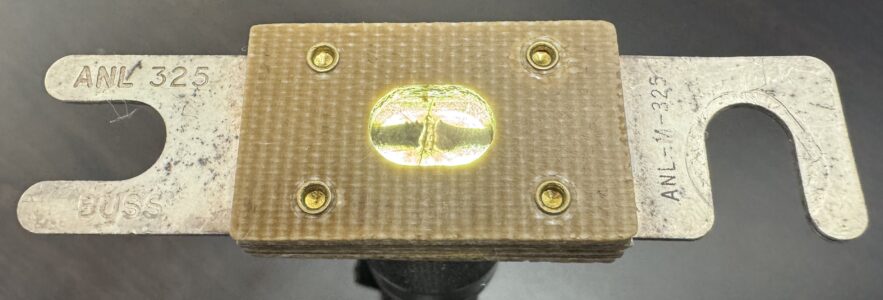
The most commonly talked about current limiters in King Airs are the 325 ampere limiters found in the dual-fed electrical system design, so that’s what we are going to focus on in this article.
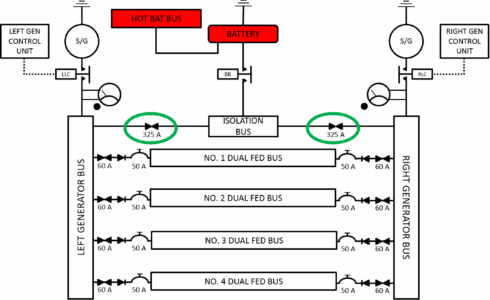
What do the 325a current limiters protect? They control the amperage flowing between the ISOLATION BUS to the LEFT & RIGHT MAIN BUSs. The first time we check the current limiters is during our cockpit preflight checks. The battery is on, we press the button on our load meters to show the voltage to the LEFT & RIGHT MAIN BUSs. If the voltage reads battery volts, we know that our current limiters are intact. If one of the volt meters shows zero volts, the current limiter on that side has failed and will need to be replaced.
The time that the current limiters are most vulnerable to damage is during engine start. Let’s take a look at how that happens.
The generator-assisted start that I will describe offers the best protection for your current limiters and can be used in any King Air. Newer King Airs (BB-1444 and newer) and triple-fed bus electrical system King Airs can perform a true cross-generator start without damaging the current limiters. Check your POH to make sure your aircraft is capable of the cross-generator start. If you have any doubt, using the generator-assisted start technique will help keep your current limiters safe.
After completing your Before Start Checklist, go ahead and start your first engine. It does not matter which side unless you are in a 90, A90, or B90 with a supercharger on the left side. In those models, the right engine first is the way to go.
Once the first engine is started, most pilots bring the generator online to recharge the battery after the start (prior to BB-1444). Here is where the problem arises: when you turn on the second starter, it will ask for approximately 800a to get the engine turning from a dead stop. The electrical demand will reduce dramatically after the engine begins to turn. The problem is that the operating generator is going to produce quite a bit of that power and send it through the current limiter on its way to the ISOLATION BUS. Remember what the current limiter was rated for? 325A Forgetting to turn the first generator off prior to initiating the second engine start will set you up for a failed current limiter.
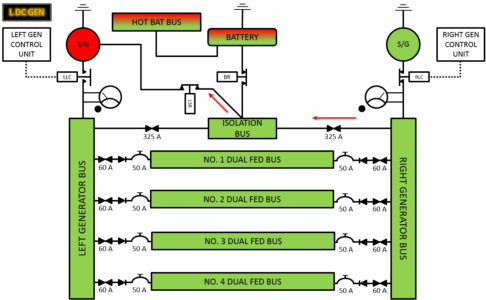
Passing 800A through a 325A current limiter is possible, but not ideal. The current limiter might be able to withstand that a time or two, but eventually, passing that much current through it will cause it to fail.
Now that we have used some power from our battery, we have a choice to make. If you are happy with the max motoring N1 speed you achieved on the first engine start (18% or so), you can skip the battery recharge step and proceed directly to the second engine start. Hit the starter for the second engine, and once N1 reaches 12% or greater, bring the first engine’s generator online. The generator will now assist in starting the second engine. I would expect to see 20% or greater N1 for max motoring with the generator assisting. The second engine start will be significantly cooler than the first engine start. Remember, the faster the N1 is before you introduce fuel to the engine, the cooler the start will be. Alternating which engine starts first is a good way to even out wear and tear between the two engines.
With both engines running but only one generator on-line we are going to do our second current limiter check. Press the button on your load meter again and check the volts on both. With one generator on and intact current limiters, you should see 28V on both voltage meters. If you see 28V on one and 24V on the other, you have blown a current limiter during start-up, most likely on the side you started first. Time to shut it back down and replace the failed current limiter. Taking off in this condition is prohibited as you no longer have a dual-fed electrical system, and the loss of one generator will cause other systems to fail with no means of restoring them in flight.
The third, and last check of our current limiters is performed after shutdown, but before we turn our battery off. With both generators offline, press the button on the load meters one last time. You should see 24v on both voltmeters. If one reads zero, the current limiter on that side needs to be replaced before your next flight. If they both read 24V, they are good, and you can turn off the battery.
The last set of current limiters we are going to talk about don’t get much attention from pilots, but they are a good thing to check once in a while. The current limiters I’m referring to are the 60A limiters between the DUAL FED BUSSs and the LEFT & RIGHT GENERATOR BUSSs. The DUAL FED BUSs are protected by 50A circuit breakers and 60A current limiters. The circuit breakers are located on the right-side CB panel in King Air 200 & B200s and the fuel CB panel under the fuel gauges. Circuit breakers are easy enough to see when they have popped, but the current limiters are a little harder to tell when they have had a problem.
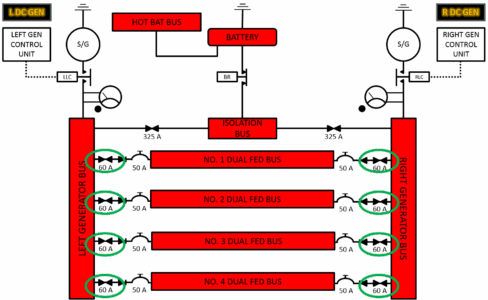
So, how do we check them? On the ground with battery power or with a ground power cart hooked up to the plane, we are going to pull the 50A circuit breakers one by one and see if we have any DUAL FED BUS failures with only one CB pulled.
Let’s walk through the procedure using DUAL FED BUS #1 as an example. The CBs for DUAL FED BUS #1 are located on the right-side CB panel, along with DUAL FED BUS #2 (DUAL FED BUS 3 & 4 are on the fuel panel CB). First, turn on the battery, ground power helps but is not required, and pull one of the NO. 1 CBs. DUAL FED BUS #1 items should still be powered; if not, the current limiter on the opposite side has failed. Assuming pulling the first CB has had no effect on DUAL FED BUS #1 items, pull the second NO.1 CB on the right-side CB panel. All DUAL FED BUS #1 items should go dead; this verifies that the CBs are disconnecting power from the #1 bus. Third, reset the first DUAL FED BUS #1 CB, and power should be restored to the #1 bus. If power is not restored, the opposite side current limiter has failed and will need to be replaced. Repeat the process for the remaining three dual-fed buses to check all of the 60A current limiters and CBs.
As you can see, protecting our current limiter during start is not a difficult thing to do. Using a generator assist-type start will protect the 325A current limiters in all dual-fed style King Airs. Occasionally, checking the 60A current limiters protecting our dual-fed buses is a good way to check that our dual-fed buses are actually dual-fed!
The In-Flight Overspeed Governor Test - by Tom Clements
Conducting the test of the propeller’s Overspeed Governor, OSG, is a necessary part of the full ground run-up procedure and should be done before and after any maintenance Phase inspection, as well as on a reasonable schedule between inspections. As you probably know, I am not a proponent of doing all these checks on the first flight of every day, even though that’s what the POH suggests. If there was a significant history of these tests routinely discovering unsatisfactory conditions or if doing the tests could guarantee that the system would not break in the next few hours, then I’d advocate doing them more often. However, neither premise is true.
The high power required to conduct the OSG test on the ground means that brake pressure must be forcefully applied and maintained, that ITT increases a lot, and that the potential for propeller blade erosion is increased. In addition, we surely are creating lots of wind and noise! Do you know you can eliminate these concerns by doing the test in flight?
I suggest that you wait until a deadhead leg presents itself before doing the in-flight test if you choose to do so. In most, but not all, cases the propeller speed you have set for the cruise is below the test range of the OSG. (The exception usually applies to the PT6A-135A-powered C90GT-series or Blackhawk-converted 90s that some pilots choose to cruise at 1,900 RPM, the maximum normal propeller speed.) Strangely, the OSG moves from its normal speed setting – about 4% above redline propeller speed – down to its test setting extremely quickly, yet the opposite is not true. It actually creeps back up from the test to the normal RPM very slowly and gently. Hence, if the actual propeller speed is above the test setting when the test switch is activated, the drop in RPM is quite abrupt. Damaging? No, but certainly not gentle.
Make sure your current propeller speed is below the test range of the OSG. If you have the older Type I prop sync, turn it off. Use your left hand to hold up the Gov Test switch. (Earlier models had two switches, one for each side. If that’s the case, hold them both up.) What we assume just happened is that the OSG’s speed setting moved from the true overspeed area down into the test range. To verify this assumption, now run both propeller levers slowly and smoothly fully forward with your right hand. As you do so, the propeller speed should rise but then stop increasing when the OSG takes control.
Isn’t that easy? No brakes to hold, no propeller erosion concern, no ITT change…piece of cake!
Now let go of the test switch(es) and watch the RPM slowly follow the OSG as it resets up to its normal value. However, at takeoff RPM, the propeller will “run unto” the primary governor and stabilize there at redline.
To finish, pull the prop levers back to set up normal cruise RPM, turn on prop sync if you’d turned it off, and you’re done.
During the ground run-up, to save time, the OSG test is combined with the Rudder Boost test for those models that have the rudder boost system. The in-flight test we are discussing is only for the OSG and does not test rudder boost.
Keep in mind that the test does not remove or eliminate the OSG – which would be undesirable, possibly unsafe – but merely resets it to a lower, even safer, value. About the only thing that goes awry here – as it can during the ground test, too – is that the OSG will stick at the test setting so that when the test switch is released the RPM does not rise up to the PPG’s setting. Relax. In almost all cases, simply wait a bit longer and it will finally reset back to normal.
And if it doesn’t ever reset? Then after shutdown, a mechanic will need to open the upper forward cowling to gain access to the OSG on the left side of the engine’s nosecase, and use his wooden mallet to gently tap – “Malletize?” – on the test solenoid connected to the governor. I have never known that not to remedy the stuck test condition.
Making Tight Taxi Turns - by Tom Clements
Are Your Ears Hurting? – A Pressurization Checkup - by Zach Cleaver
Pressurization can be one of the most frustrating aspects to troubleshoot. Do I set it at my destination field altitude? Do I set my cruise altitude? Do I leave it at my departing field elevation if I’m going to return without another stop?
Let’s set up the pressurization controller, then run a test on your pressurization system to confirm it is working as intended.
Setting Your Pressurization Controller – Takeoff
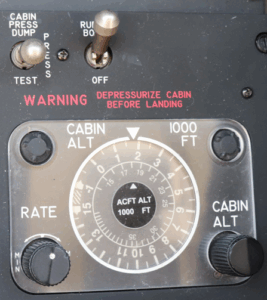
During your pre-departure run-up, one of the POH’s required checks is a pressurization check. Here is the procedure it lays out:
Pressurization…CHECK AND SET
| 1. Bleed Air Valves | OPEN |
| 2. Pressurization Controller | SET |
|
|
| 3. Cabin Pressure Switch | HOLD IN TEST POSITION |
| 4. Cabin Altimeter and VSI | CHECK FOR DESCENT INDICATION |
| 5. Cabin Pressure Switch | RELEASE TO POSITION |
| 6. Pressurization Controller | SET |
|
Once we have reached our cruise altitude, say FL250, we would have set 26,000 feet on our pressurization controller, which would result in a cabin altitude of a little over 6,000 feet at max differential (6.5 PSI) in a B200. With either flow pack operating, the maximum differential should be able to be achieved; together, they should easily be able to hold the maximum differential.
Setting Your Pressurization Controller – Landing
The POH calls for setting the pressurization controller to 500’ above the landing field pressure altitude. That works if the pressure is standard (29.92” Hg). What should we do if the field atmospheric pressure is not standard? We need to adjust our controller settings to account for non-standard pressure. Thankfully, we have been given a chart that does just that!
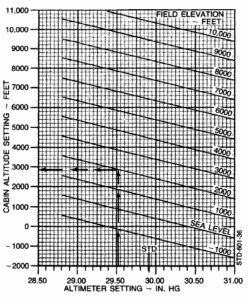
Going through all those lines while flying can be challenging.
We can also do the math in our head to get the correction to add or subtract from our destination field elevation.
Remember the old private pilot rule: 1 inch of Mercury equals 1000 ft. We can also say: 0.1 inHg = 100 ft on a non-standard atmospheric-pressure day.
If the current local altimeter setting is 30.56, compare it to the standard 29.92; it is 0.64 higher, resulting in a 640 ft lower reading than standard. We round it to the nearest 100 ft.
Due to the controller’s inaccuracy, we always start by adding 500 ft to the field elevation, then apply a correction for non-standard atmospheric conditions.
Here is a chart that has the same information in an easier-to-read format.
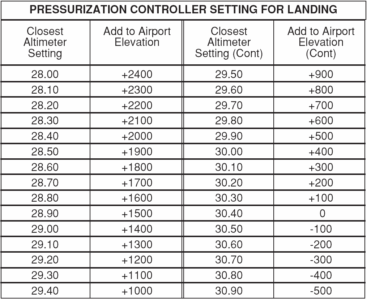
Now that we have the normal setting of our pressurization for takeoff and landing covered, what happens if our pressurization system is not working the way we expect it to?
Is it a flow pack problem? Is it a leak rate problem? Is it a combination of both? How do we determine where to start looking? What follows is a procedure you can use to check the health of your flow packs and the leak rate of your King Air.
Procedure
- Establish level cruise flight at maximum pressure differential (∆P), using normal cruise power setting, between 15,000 and 18,000 feet.
(To do this, simply set the controller’s cabin altitude for a sea level or lower and climb until the cabin begins to climb also) - Record:
Aircraft pressure altitude: _________________ feet
Indicated cabin altitude: ___________________feet
Indicated differential pressure (∆P): _________psid
Indicated cabin rate-of-climb: _________fpm (should be 0)
Engine speed: ______________ / ______________ % (L/R)
Conduct steps 3 through 6 for the left side only, recording the results in the appropriate spaces. For now, leave the results concerning the right side blank.
- Watch the cabin rate-of-climb indicator as you turn the left bleed air switch to the “Envir Off” (center) position. The indicator should rapidly rise to a maximum peak, then descend.
Record: Cabin’s peak rate-of-climb: _____________ / ____________ fpm
(Left Off) (Right Off)
- Rapidly move the left power lever to idle while watching the cabin rate-of-climb indicator. If the flow pack is properly shutoff, there should be no change. Return to normal cruise power. Circle the appropriate answer on one line below.
Does the left flow pack indicate that it is shutoff completely? YES / NO
Does the right flow pack indicate that it is shutoff completely? YES / NO
- When the cabin stops climbing or descending, with the rate-of-climb indication stabilized at its original reading:
Record:
Indicated ∆P (left pack off): _________psid
Indicated ∆P (right pack off): _________psid
(Should be maximum, same as before) - Turn the bleed air switch back on. Wait until there is an indication that the flow pack has reopened successfully (such as a momentary cabin descent surge, louder airflow noise, rise in ITT, or reduction in torque), and until all parameters return to their initial values. Sometimes, this takes a very long time (10 minutes or more), and occasionally a flow pack won’t reopen at all during this flight. In that case, terminate the check until another flight can be made.
- Repeat steps 3 through 6 for the right side, recording the values in the appropriate places that you left blank before.
- With both bleed air switches back on and all parameters at their original values, watch the cabin rate-of-climb indicator as you move both bleed air switches to the center simultaneously. (DO NOT go to the bottom position, you will lose your door seal). It should rapidly rise to a maximum, then show a slow, continual reduction. (With decreasing ∆P, the air doesn’t leak out as fast, so the cabin doesn’t climb as fast.)
Record: Cabin’s peak rate-of-climb: ___________ fpm
This is your airplane’s leak rate. It is excessive if it exceeds 2500 – 3000 fpm. However, it is not uncommon to find leak rates well above 5,000 fpm. This is not necessarily dangerous, but it does imply that, if an engine fails or a bleed switch is turned off in flight, the airplane would not be able to maintain proper pressurization. Also, with a high leak rate, one can expect more pressurization irregularities than typical. (e.g., a cabin climb when power is even slightly reduced during descents).
- Optionally, you may wish to keep the bleed air switches off until the cabin climbs high enough to trigger the “Alt Warn” annunciator to verify that it is functioning properly. It should illuminate at 12,500 ± 500 feet.
To prevent the passenger oxygen masks from dropping if the cabin accidentally goes above 12,000 feet, pull the “Oxygen Control” circuit breaker, under “Environmental” on the right CB panel.
- Turn the bleed air switches back on; the test is complete.
This test will tell you whether one of your flow packs is weak or not working properly, and whether your plane has an excessive leak rate. One other thing you can do is have a pilot with good hearing (They exist, right?) get into the cabin of your plane while at max differential and listen near the emergency exit and the door for leaks. This information can greatly help your maintenance shop diagnose and repair your pressurization system.
With a pressurization system in good working order, those painful ears should be a thing of the past!
Pushing Your Limits? - by Pete Marx
We have all been to some sort of training class as a pilot. In these classes, we have been shown the limitation section of the Pilot’s Operating Handbook (POH), otherwise known as the Aircraft Flight Manual (AFM). After the books have been closed and class is over, it is very easy for us to never think about the limitation section again. We have red lines on all the instruments, which will keep us out of trouble, right? Maybe, maybe not.
Many PT6 engines installed in King Airs have a Cruise Climb ITT limit that is lower than the Max Cruise Limitation. Is this limit depicted with a red line on the ITT gauge? No, it is not. If you are flying a King Air with this limit, memorize it. By doing so, during the climb, the engine power will be set without exceeding a limitation. If you have modified your King Air with different engines, you will need to review your AFM supplement, which supersedes the original AFM limitation section, to determine whether the limitation has been removed or changed.
PT6 engines are very good engines. If maintained correctly, the chances of having an abnormal engine start is very low. Many clients I have instructed have never had an abnormal engine start while operating their King Air. This is a testament to the PT6 engines.
Let’s say we add fuel during an engine start in our PT6 engine, and the ITT shoots up rapidly. What do we do next? Following the King Air 90 and 200 series AFM’s, it tells us to move the condition lever to cutoff and motor the engine for the remainder of the starter duty time. In the 300 series airplanes, the AFM says to motor the engine until the ITT gets below 400 degrees. Why the difference?
To answer this question, we will discuss the starter duty cycle. In the 90 and 200 series King Airs, the starter is limited to 40 seconds on, 60 seconds off, 40 seconds on, 60 seconds off, 40 seconds on, then 30 minutes off. The reason for the 40 seconds on is to prevent the starter from overheating. This limit is in place to protect the starter while the starter is doing all the work, driving the engine (the engine is not producing any power). If you forget to turn off the starter during engine start (you won’t be the only one who has done this), the starter will just go along for the ride, not hurting anything at all. You will figure this out when you can’t get the generator to turn on. Oh yeah, I need to turn off the starter before the Generator Control Unit allows the starter to act as a generator.
Back to the hot start, in the 90 and 200 series airplanes, the procedure directs you to motor the engine to the remainder of the starter duty time, of 40 seconds, in order to reduce the ITT. That 40-second duty time cycle should be more than enough time to reduce the ITT down below 300 to 400 degrees ITT. Hmmm, how do I know how much time has passed since I turned on the starter? I know… I can just count the time in my head during start. In reality, it is very difficult to perform an abnormal procedure while keeping track of time in your head. One way to help yourself is to start a timer when the start switch is moved to the on position. If there is a hot start, when you motor the engine, you will only need to reference the timer in order to know when to discontinue motoring at 40 seconds.
In the 300 series King Airs, the starter duty cycle is 30 seconds on, 5 minutes off, 30 seconds on, 5 minutes off, 30 seconds on, 30 minutes off. During the start sequence, it may take 10 to 15 seconds before we even add fuel. By the time we recognize the hot start and chop the fuel, it may be as long as 20 seconds. Remember, in the 300 series airplanes, it tells us to motor the engine until the ITT gets below 400 degrees. Motoring for only 10 seconds may not be enough time to reduce the ITT. I think the Hot Start procedure was written in such a way to prioritize the ITT, instead of the 30-second starter limit. This prioritization will cause the ITT of the engine to be decreased, thus saving the engine and sacrificing the starter. The engine is much more expensive when compared to a starter.
What happens if we add fuel during engine start and there is no ITT? How long will you wait before you do something? The first part of the procedure says: “If no ITT rise is observed within 10 seconds after moving the Condition Lever to LOW IDLE…” this does not mean you have to wait 10 seconds. It means you should not add fuel for more than 10 seconds without a light off. The more that time passes, the more fuel pools in the engine. For example, during start when you add fuel, there is a malfunction with the ignition system causing it not to spark, then suddenly it operates correctly….click, boom! All the fuel ignites. This is NOT good for your expensive engine! What to learn: If it does not light off within the normal time for your engines, cut the fuel and turn off the starter. Get the checklist out and follow it.
These start malfunction checklists do not include bold or memory items as published. They are not practical to perform as a “read and do” checklist. Therefore, these items should be committed to memory. In addition, include a timer at the beginning of your engine start sequence. It will potentially save the owner of the aircraft a great deal of money by complying with these procedures in the event of a start malfunction.
Some other Limitations which are important:
- Maneuvering Speed (Va)
- Turbulent Air Penetration Speed (Vb)
Maneuvering Speed (Va) is defined as the maximum speed at which full control deflections can be made without risking structural damage.
Flying at or below Va means that the airplane will stall before the structure is damaged by excessive loads. If you encounter a gust that causes a sudden, significant increase in load factor while flying above Va, the aircraft could experience structural failure.
Well, that sounds easy; to prevent structural damage, I will just fly at Va, and I will have no risk for structural damage, right? Not so much in the real world. Turbulence will increase the load factor, but can and usually does increase the airspeed momentarily. Therefore, if you are flying at exactly Va, thinking you are safe, and encounter turbulence, your load factor and airspeed will increase, causing the possibility of structural damage.
Another important thing to understand is that Va changes with the aircraft’s weight: Va decreases as the aircraft’s weight decreases, and it increases as the aircraft’s weight increases. It is a mistake to assume that as long as you are at or below Va, you can move the controls from stop to stop repeatedly without damaging the aircraft.
To clarify this point, 14 CFR part 25 states: “flying at or below the design maneuvering speed does not allow a pilot to make multiple large control inputs in one airplane axis or single full control inputs in more than one airplane axis at a time without endangering the airplane’s structure.” Although GA aircraft are certificated under 14 CFR part 23, this point is still valid.
Due to this, the best practice would be to slow to the Turbulent Air Penetration speed (Vb). In the King Air B200, Va is 181 knots, and Vb is 170 Knots. Notice that Vb is slower than Va, which gives you a buffer.
These are just a few ways limitations affect our everyday flying, and why our training events highlight the limitations section of the AFM/POH. Often, we attend training to check a box for our insurance company, but understanding our aircraft better can lead to a safer, more efficient pilot.
Pressurization Basics - by Tom Clements
In a recent internet thread on pressurization, I noticed some misconceptions held by quite a few folks. Let me try to set the record straight, or at least straighten it out a little bit.
1. Differential Pressure, ∆P, (pronounced “Delta P”) is nothing more than the difference between inside and outside absolute pressures: ∆P = PCABIN – PSTATIC. Except for the first 65-90 model, King Airs have maximum certified ∆Ps ranging from 4.6 to 6.5 psid (pounds per square inch differential). As in everything that is mechanical in nature, there must be some tolerance and the allowable tolerance in this ∆PMAX is plus or minus 0.1 psid. In other words, when running on the maximum differential pressure relief, any ∆P within 0.1 psid of the certified maximum means that your King Air is doing what it was designed to do. Of course, Beechcraft marketeers were quick to put the highest Maximum figure in the brochures. So if you are operating a B200 that, according to the salesman, can pressurize to 6.6 psid but you’re only getting 6.4 psid, there is nothing amiss at all. The salesman merely quoted the high end of the allowable range but you happen to have an airplane with the Outflow and/or Safety Valve relieving at the low end of the range.
2. The purpose of the Pressurization Controller is merely to be a governor on Cabin Altitude. Within its capabilities, it will make the cabin climb or descend to a newly-selected Cabin Altitude value determined by the rate knob and then keep the cabin at that altitude the best it can. Just like a propeller governor cannot always maintain the selected RPM – it drops off on landing as the governor causes the blades to flatten as far as they can go – likewise the pressurization controller cannot always maintain the selected cabin. Two things will prevent this: First, the cabin can never be higher than the airplane. That would cause a negative ∆P value, which is prevented by dedicated relief valve portions contained identically within both the Outflow and Safety Valves. Second, the cabin cannot maintain the selected altitude if doing so would cause maximum attainable ∆P to be exceeded. That “maximum attainable ∆P” is often not the maximum certified ∆P, as I will explain.
To maintain the cabin at any selected altitude, all that must occur is for total air mass inflow to equal total air mass outflow. In the King Air, as in most all pressurized airplanes, the incoming flow is regulated to be as constant as possible and all control of cabin altitude and rates of climb and descent are accomplished by varying the outflow through the Outflow Valve. Of course, what exits through the Outflow valve is not the total outflow…we have to consider the contributions of all the little and big leaks. Here’s where the conceptualization gets tricky. How much mass flow exits through the leaks depends upon ∆P. If there is a low ∆P, then the push that causes air to flow through the leak hole is small and hence the flow is small. But when ∆P is large, then the mass flow across the leak is also large, even though the leak size has not changed.
Let me apply some numbers to an example. Suppose that both the left and right inflow systems were pumping in 7 pounds per minute (ppm) of air, for a total of 14 ppm. To keep the cabin from climbing or descending, a total outflow of 14 ppm must be taking place. If at maximum certified ∆P, the leaks accounted for a total of 5 ppm, that means that the Outflow valve would be positioned to allow 9 ppm to escape. 14 ppm in, 5 + 9 ppm out…we’re in balance and the cabin is holding its altitude, maintaining constant cabin pressure, neither climbing nor descending.
Now let’s make the leaks add up to 20 ppm at maximum ∆P. (Don’t ask me how we got to maximum ∆P, because we won’t be staying there, as you’ll see.) Since now, even with the Outflow valve totally closed, there is more air exiting (20) than entering (14) a net loss of cabin air is occurring and the cabin must be losing air molecules, losing pressure, and hence climbing. As the cabin climbs while the airplane flies level, however, ∆P is decreasing and hence the mass flow through the leaks are also decreasing. As the cabin goes up and ∆P goes down, eventually a perfect balance will be reached, wherein the leaks total 14 ppm, equal to the inflow. At that point, the cabin stops climbing. But now you see two common but incorrect indications: First, the cabin is higher than the altitude you’ve dialed into the controller, and second, your maximum attainable ∆P is well below the correct value, not having the needle near the top of the green arc on the ∆P gauge.
3. The Bleed Air Flow Control Unit – also known as a “Flow Package” or “Flow Pack” – on the King Air, not only attempts to keep total inflow constant but also achieves the total flow by mixing ambient air with bleed air, varying the ratio dependent upon OAT when airborne. On the ground, ambient air is excluded.
The good ol’ PT6 does not suffer from an overabundance of bleed air and rest assured that none whatsoever will be wasted by dumping it overboard out of the engine’s compressor. The only time some bleed air in the PT6 is being dumped is at idle and low compressor speeds and this dumping is to allow a better balance between the axial and centrifugal compressor stages. Even the relatively small portion of compressor air that is bled from the engine for cabin pressurization and heating in a King Air – never exceeding 5% of the total airflow – typically causes the engine to run about a 10 degree hotter ITT than if the bleed air were shut off and allowed to remain in the engine.
That’s why it behooves us to leave the bleed air switches in the Closed or Off position until safely in the after takeoff climb when departing from a higher altitude, hotter day airport at which we will be temperature, not torque, limited. This technique may give us 50 ft-lbs or more of additional torque.
4. When a bleed air switch is turned off in flight, seeing a momentary large rate of cabin climb is good. Seeing hardly any cabin movement is bad. This seems backward to lots of folks until it is properly explained and the reasoning makes sense.
Go back to our previous example of 14 ppm inflow and 14 ppm outflow, comprised of 5 ppm or leaks and 9 ppm exiting through the Outflow Valve. However, let’s make one of the Flow Packs weak, providing only 4 ppm or inflow. With total inflow now (7 + 4) 11 ppm, the Outflow Valve must adjust to allow 6 ppm to exit. That amount, combined with the 5 ppm of leaks, makes inflow and outflow identical and keeps constant pressure and altitude in the cabin.
If the stronger Flow Pack is turned off, we momentarily experience a leak rate of 7 ppm, since now 4 is entering but 11 is still exiting, until the Outflow Valve has started to reposition properly. But if the weaker Pack had been turned off, now the momentary leak rate would be only 4 ppm, and hence the cabin would not start climbing nearly as fast.
I hope this aids your understanding of the pressurization topic.
Reduced Power Takeoffs, Minimum Acceptable Power & Verifying Max Torque - by Zach Cleaver
At King Air Academy, we get this question fairly frequently:
“Can I do a reduced power takeoff to save wear and tear on my engines?”
The short answer is “No, you can’t do a reduced power takeoff.”
Followed up by “Why?”
We don’t have charts that give us the performance numbers we need to make a safe decision. Beechcraft has never published reduced power takeoff data for King Airs. Without that data, we don’t know how our plane is going to perform given the conditions in which we are flying. If you choose to perform a reduced power takeoff, you are becoming a test pilot.
Speaking of knowing if our performance data is accurate, how do we know that our aircraft can meet the requirements of the flight? We check out takeoff distances, accelerate stop distances, climb gradients, and single-engine performance, among others, before we fly. All of those charts have been created by the manufacturer to help us know what to expect and plan for during our flight. However, what makes those charts accurate after they have been created? Our performance data is based on the minimum acceptable power being produced by our engines. How do we know what that is? We have a chart for that!
The Minimum Take-Off Power chart.
This chart shows the minimum amount of torque we need to produce from our engines to make our performance charts true.
The following charts are for a B200 (BB-1439, BB-1444 thru BB-1842, except BB-1463 & BB-1834; BL-139 thru BL-147; BW-1 thru BW-29). Make sure you are using the appropriate charts for your model and any modifications made to it when making your calculations.
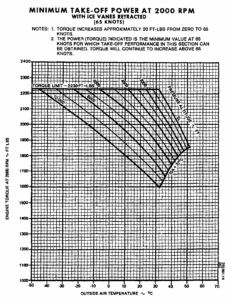
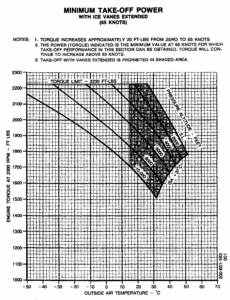
Read the notes carefully; there is important information in them.
Note number one says that torque will increase approximately 20 FT-LBS from zero to 65 knots. Why is this important? As we increase speed, air going into the engine compresses slightly, giving us “ram rise”, a small increase in torque. The chart is valid, for this example, at 65 knots.
But what is this telling us? It says that at our field temperature and pressure altitude, we should produce X amount of torque before becoming ITT limited. If we produce or exceed the amount of torque required by the chart (at 65 knots), then our performance calculations will be true; if we don’t, then our performance numbers will not be accurate and cannot be relied upon.
The second chart (Ice Vanes Extended) has a large grey area. The 200 series cannot have its ice vanes extended above 15° C. Take a look at the different Minimum Acceptable Torque numbers between the two charts. On the Ice Vane Retracted chart for a 10° C day at a pressure altitude of 4000 feet, you would expect to make maximum torque before becoming ITT limited. Using the same temperature and pressure altitude on the Ice Vanes Extended chart results in a minimum acceptable torque of 2160 FT-LBs before becoming ITT limited. If you cannot make the minimum torque at 65 knots, then you do not know if your plane is capable of performing the way you expect it to.
Finally, things pilots may do is use a slightly lower than maximum power setting in cruise to help preserve their engines. This is a normal and accepted practice. What is not done nearly as often is checking that you are producing book torque and speed at cruise. Why do we need to check this? This tells us if our engines are working the way they are supposed to.
The following chart shows the Max Cruise Power for a B200; please use the appropriate chart for your aircraft.
Maximum Cruse Power at 1700RPM Chart
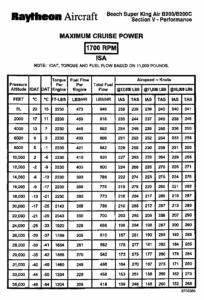
It shows that at FL240 on an ISA day, you should be able to set 1920 FT-LBs torque without exceeding ITT limitations. This should result in an indicated air speed of 196 and a true air speed of 284 kts at 12,000 lbs. If you cannot achieve book speeds and torque,s it might be worth looking into. Be aware that some common modifications to King Airs will alter their speed, such as wing lockers, high-float gear, extra antennas, etc.
Remember, don’t be a test pilot; make sure your engines deliver enough power to make your performance charts accurate. The occasional max-speed check is an indicator of your engine’s health; check it once in a while.
The Three Ways to Fly a King Air - by Tom Clements
Can you guess the three ways? Don’t sweat it. I will give you my answers right away. However, if you cannot speculate what my answers will be, then I’ll wager that you are not giving the three methods their proper attention. Although these methods can also apply in visual flying, I am primarily considering the instrument flying environment as I discuss this.
The first way is engaging the autopilot, programming its modes appropriately, then sitting back and serving as the true Pilot-in-Command while “Otto” does the mundane tasks of physically controlling pitch and roll.
The second method is just the opposite: Leave the autopilot and the flight director alone and revert to raw data flying. “Why would I want to do that, Tom? That’s hard work and keeps me far too busy!” About the only logical reason for using this method – unless you take perverse joy in masochism – is to be better prepared for the time the AP/FD computer fails and you are forced to take matters into your own hands until repairs can be made.
The third way is to hand-fly while using the flight director. More common than a complete AP/FD computer failure is the failure of a single autopilot servo. The AP can no longer control both pitch and roll properly but the computer still knows exactly what bank and pitch attitude is called for and can direct the pilot to the proper attitude by movement of the V-bar or cross-pointers.
Have you used all three methods – No! Not in equal amounts! – in the last twelve months? You should have. None of us can remain comfortable and proficient in the three ways unless we practice them at times.
Maybe you are thinking that your annual recurrent training session will address the second and third methods and you will stick with autopilot the rest of the time. Okay. I can buy that approach, but…
The “but” is that neither you nor your instructor will be impressed with your skill when it’s been a year or so since you have last exercised that particular method of airplane control. We are expected to operate to the standards specified in the Practical Test Standards (PTS) applicable to our rating regardless of what method we are using. Keeping the ILS localizer and glideslope within half-scale deflection while hand flying with raw data…whew, that ain’t easy!
So to make both the training provider and yourself come away with more warm, fuzzy, feelings about your skill, please try to practice all three methods with some regularity. Each of us is different and what applies to one will not necessarily apply to another. For example, perhaps a high-time professional who spent years doing instrument instruction may find that he or she may remain totally sharp while using a breakdown of 90-8-2. That is, 90% of the actual flights will be with the autopilot engaged, 8% will be hand flying with no computerized help, and 2% will be hand flying while following the properly-programmed fight director modes.
For the relatively low-time newbie, maybe the breakdown should be 60-20-20. Maybe for the right seat “warmer” – for the few times he or she is actually manipulating the controls in IMC – perhaps 10-50-40 serves best.
I ask you to consider your personal allocation of time spent in the three ways and modify them as needed if your training results are not quite as sharp as you desire.
T-Tail King Airs and Secondary Stalls - by Tom Clements
I am sure all readers here have experienced first-hand a secondary stall once or more during their flight training. In fact, for the CFIs in the group, you have probably observed them hundreds of times: An inexperienced pilot gets a little too aggressive in recovering from a first stall, pulls the stick or wheel back too forcefully and increases the angle-of-attack (AOA) enough that he or she encounters another stall, the secondary stall. Here’s a little secret for your memory bank: The T-Tailed King Airs – F90- 200- and 300-series – may be the most likely mass-produced airplane ever built to coax into a secondary stall. Allow me to explain.
Moving the horizontal stabilizer and elevators to the top of the tail means they usually reside in the relatively undisturbed air. As the wing approaches the stall angle-of-attack and air starts to burble over it, little of that disturbed air hits the horizontal portion of the T-tail. Consequently, there is very little pre-stall buffet felt in these planes. Were it not for the stall warning horn installed, it is difficult for the pilot to sense that a stall is being approached.
After the stall is recognized and recovery is begun, the elevators are still very effective, not being blanked by the disturbed airflow off of the wing as happens in a conventional-tailed airplane. It takes little force and control wheel motion in the cockpit to move the elevators enough that the angle-of-attack can quickly be increased to a critical degree…leading into the secondary burble or actual stall.
I will never forget – and I have demonstrated this phenomenon to many other King Air pilots whom I have trained over the years – when Bud Francis, the 200’s Chief Test Pilot, showed me the effectiveness of the elevators and how little force is required to reach stall AOA. In BB-1, the first prototype test airplane, he did a very gentle approach to a clean stall, with airspeed reducing at the rate of about one knot per second, while trimmed for about 130 knots…about 1.3Vs. The stall occurred with a slight buffet and the nose falling, at about 100 KIAS. Bud then kept power at Idle, allowed the nose to drop to increase speed to 120, then pulled back on the control wheel again. However, to emphasize how little force was required, instead of having his whole hand on the wheel, he just hooked the little fingers of his two hands on the wheel as he pulled. Very rapidly, a stall buffet was felt as G-forces loaded the wing. Once again, the nose was allowed to fall, airspeed was increased another 20 knots – now going to 140 – and the whole process was repeated. Bud kept this up all the way to 160 KIAS, where it was still easy to induce stall buffet using little finger pressure alone. He then had me take the controls and repeat the demonstration from 100 to 160. It was indeed eye-opening to experience the relatively low pull forces that were needed to make the wing experience an accelerated stall even at 160 knots.
Since the T-Tail was a new design on the King Air family with the introduction of the 200 model, Beech was unsure whether the plane would exhibit sufficient stall warning and elevator effectiveness to recover properly, so BB-1 was originally fitted with both a stick shaker and stick pusher. Happily, it was found that neither was necessary, so they were not included on production airplanes. What is included, however, is something few pilots have noticed.
So what is this hidden secret? It is a note presented on the “Stall Speeds – Idle Power” graph in the Performance section of the POH. The note states, “A normal stall recovery technique may be used. The best procedure is a brisk forward wheel movement to a nose down attitude. Level the airplane after airspeed has increased approximately 25 knots above stall.”
I wonder how many FAA pilot examiners would not be aghast if they observed a pilot delaying aggressive stall recovery until airspeed had increased 25 knots?! Aren’t we all basically taught to reduce the angle of attack just enough to break the stall, add power (if available), and fly out of the stall? Sure, we are, as it should be. In a T-Tailed King Air, that same procedure works perfectly 99% of the time, and it’s what we do. But…keep in mind how powerful the elevators on this T-Tail are and be gentle as you add back pressure to initiate the climb back to your assigned altitude. Avoid that easily-induced secondary stall!
Are you a “Stable” Pilot? - by Pete Marx
I believe we all have heard the term “Stabilized Approach”. What is a stabilized approach, and why should I practice it?
One of the many aspects that makes the King Air appealing is that it is a very forgiving airplane. This makes it a great platform to transition into from a slower, nonpressurized, reciprocating aircraft. Once experience is gained, and we are comfortable in the King Air, we can sometimes push the limits on what the airplane can do. For example, when the controller asks us, “King Air XYZ, can you make a short approach to runway xx?” Too often we find ourselves complying by performing a very close in base-to-finial, with a 45 degree bank angle, and high sink rate. In a turboprop airplane, the pilot can pull the power levers to idle at any time without concern for cooling the engine too rapidly. Consequently, rapid descents with the propellers in low pitch can be dramatically steep. The King Air is so forgiving that you may be able to get away with this maneuver. This can be fun; however, it is reducing our buffer of safety significantly. If it results in a successful landing, it will reward unsafe behavior.
What do I mean by buffer of safety? If we think of a target that represents safety, where the center of the target is the highest level of safety, as you move towards the outer rings, your safety level decreases until you are outside the target, resulting in an accident or incident. Our goal is to be as close to the center of the target as possible. (See Figure 1) This will give us the biggest buffer of safety. If something goes wrong, we will have a buffer to fix it. If we are already operating near the edge of the target and something goes wrong, then we fall off the target and end up with an incident or accident. (See figure 2).
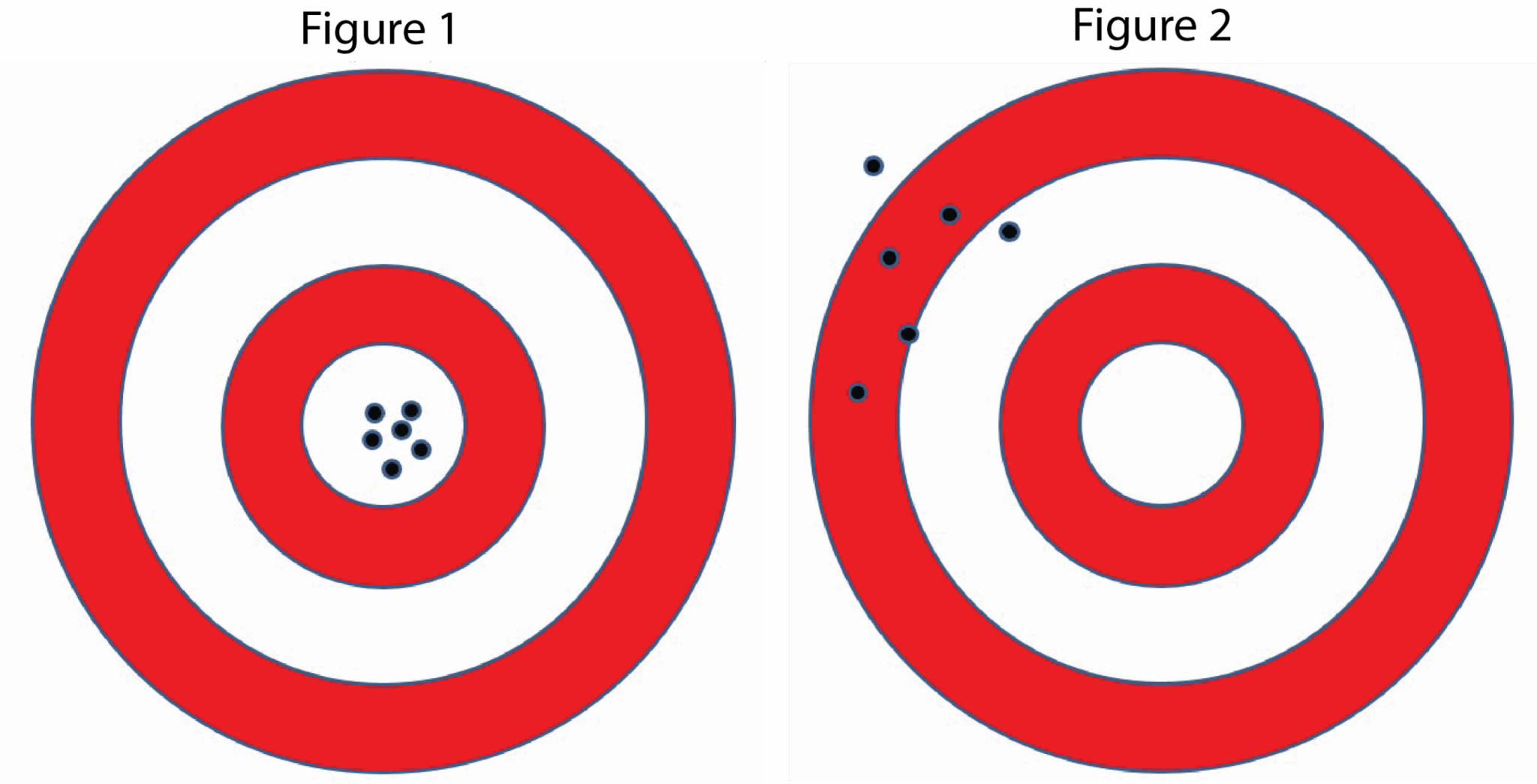
On January 4, 2020, A King Air B200 was making an approach in instrument conditions at the Morristown, New Jersey, airport. The pilot reported that he saw an area of patchy fog over the approach end of the runway and leveled off to avoid the fog. He landed the airplane with about 3,000 ft of the nearly 6,000-ft-long runway remaining and felt the airplane hydroplaning while using a combination of wheel braking and the beta range of the propellers. The airplane subsequently overran the end of the runway onto grass and mud, causing the nose landing gear to collapse. The airplane sustained substantial damage to the forward fuselage.
Why was the pilot unable to stop in 3,000 feet? Stopping a King Air B200 in 3,000 feet should not be too difficult. Let’s say the pilot was on speed and descending normally on the approach. We don’t know what altitude the pilot leveled off. If the approach is flown to minimums and the runway is not in sight, the pilot needs to go around. By leveling off at some point, then diving for the runway when it came into sight, the airspeed may have increased to a higher-than-normal approach speed. It is also possible that the decent rate was higher than normal. The pilot is no longer in the center of the safety target and has moved closer to the edge. But all is well, right? The King Air is a forgiving airplane. The pilot is thinking, “I can stop this airplane in 3,000 feet.” As it touches down, fast and max braking is used. The standing water, which was not accounted for, causes the event to go outside the edge of the safety target. The pilot has lost the buffer of safety, resulting in a runway overrun.
So, how do we stay near the center of the safety target?
We have all heard the saying, “A good approach makes for a good landing.” A Stabilized Approach is a way to mitigate risks during the landing phase of flight, potentially resulting in a runway excursion, loss of control, or collision with terrain. Following Stabilized Approach procedures, FAA Best Practices, and Aircraft Checklists keeps us at the center of the target of safety, and gives us a buffer for fixing excursions. This results in lowering our overall risk.
According to the FAA’s Airplane Flying Handbook, Chapter 9, there are seven elements of a Stabilized Approach.
- Glide path. Typically, a constant 3 degrees to the touchdown zone on the runway (obstructions permitting).
- The aircraft tracks the runway centerline, requiring only minor heading/pitch changes to correct for wind or turbulence and maintain alignment. Bank angle is normally limited to 15 degrees once established on final.
- The aircraft speed is within +10 /-5 KIAS of the recommended landing speed specified in the AFM, 1.3VSO, or on approved placards/markings. If the pilot applies a gust factor, the indicated airspeed should not decay below the recommended landing speed.
- The aircraft is in the correct landing configuration with flaps as required; landing gear extended, and is in trim.
- Descent rate. A descent rate (generally 500-1,000 fpm for light general aviation aircraft) makes for a safe approach. Minimal adjustments to the descent rate as the airplane approaches the runway provide an additional indication of a stabilized and safe approach. If using a descent rate in excess of 500 fpm due to approach considerations, the pilot should reduce the descent rate prior to 300 ft. AGL.
- Power setting. The pilot should use a power setting appropriate for the aircraft configuration and not below the minimum power for approach as defined by the AFM.
- Briefings and checklists. Completing all briefings and checklists prior to initiating the approach (except the landing checklist), ensures the pilot can focus on the elements listed above.
If the approach is no longer within the Stabilized Approach criteria, a go-around should be initiated.
I’m sure the B200 accident aircraft pilot mentioned earlier in the runway over-run would have gladly traded the over-run for a go-around.
According to Advisory Circular 91-79B, para 5.2.1 – Unstabilized Approach. Deviations in airspeed, altitude, descent rate, glideslope, runway aim point, and localizer control place pilots in a position where recovery to the desired flight path is unlikely. It is the pilot’s responsibility to inform ATC when compliance with an instruction will result in an unstabilized approach.
Going back to our earlier example, when the controller asked the King Air pilot, “King Air XYZ, can you make a short approach to runway xx?” The best practice would be to reply, “Unable, we will need to continue downwind.” I can hear the grumblings of some King Air pilots after reading that last sentence. Yes, the controller may not be happy with your response; yes, you are not getting a shortcut to land early; however, you have now reduced your overall risk for that approach. If more King Air pilots said no to these types of requests (those that would result in an unstable approach), the controllers would be less likely to issue those requests. The controllers don’t push the airliners into an unstable approach because those pilots say “unable”.
We all know that the King Air can do some amazing things. Every time we make a successful landing that is not a result of a stabilized approach, it feels rewarding, making it seem like unstable approaches are fun, normal, and not a problem. Not as obvious is the fact that an unstabilized approach is causing us to be closer to the edge of the safety target. Due to that, we now have less of a buffer for recovery if something unforeseen happens, which may result in an incident or accident. We can limit our overall risk if we practice Stabilized Approaches.
Little Things... Mean a Lot? - by Tom Clements
In this article, I will present my observations of five or six little King Air annoyances that I see quite often.
Seat Positioning
Unless you know with 100% certainty that you will be the next occupant of your pilot seat – in which case, do what you want! – please leave the seat in the position that makes it easiest for the next pilot to enter. That means making sure that you position the seat fully down and fully aft before you exit the cockpit. I failed to do this years ago when conducting recurrent training for a rather large flight department in the Northeast and got a royal chewing out by their chief pilot. Now, in my later years with my flexibility not as good as it once was, this is becoming even more of an irritant and I am more sympathetic to his lament than I was when I received it. I am about five feet nine inches in height and can usually squeeze in regardless of where the seat is – with difficulty – but big guys really cannot get in until the seat gets down and aft. Be considerate of the pilot who comes after you.
Rudder Pedal Positioning
I hope all King Air pilots realize that each rudder pedal has two positions, one closer to the pilot and one further away, Depending upon the length of your legs and where you prefer the seat to be positioned, one of these choices will work better than the other. Once you find your preference, make sure both pedals are positioned properly as you “make your nest” in the cockpit. It’s very important that you can indeed move the pedal through its entire range of travel for the rare flight situation that may require maximum control authority.
It is almost laughable, the number of times I have found one pedal in the forward position and the other pedal in the aft position! Unless you have one leg considerably shorter than the other, this is not the way to go. More than one pilot through the years expressed amazement when he or she found that the pedals did not have to be staggered. “I just thought that’s how it was rigged!” is a statement I have heard too often.
A very good change was made back in the 1970s when Beech moved the adjustment lever from the outboard to the inboard side of the rudder pedal shaft. On the inboard side, the lever can almost always be moved by one’s foot, while the other foot positions the pedal to the desired location. Early King Airs with the lever on the outboard side often require manipulation by hand. Unless you are quite small and extremely flexible, that means making the adjustment before you sit down, by leaning over the pedestal and the seat from a kneeling position.
Parking Brake Usage
The King Air parking brake is very effective and easy to apply and release. I still find a lot of King Air pilots who have not overcome their initial instructor’s admonition to not ever utilize the brake. Yes, in some trainers, the brake was rather pathetic, but that is certainly not the case in the King Air.
Trust it? No, never! We need to always stay vigilant and be prepared to apply the brakes ourselves if ever the parking brake fails to hold. However, you will find that the brake does a great job 99% of the time or more.
And what is the best order of steps when applying the parking brake? Pull the knob and then pump up the brakes or, vice versa, create the pedal pressure first and then pull the knob? Guess what? It doesn’t matter! Since pulling the knob only creates a one-way check valve, brake fluid pressure can still be sent to the wheel after the one-way valve is activated.
When ready to taxi, it is “kinder, gentler” on the system to always apply brake pedal pressure first before pushing the parking brake knob in to release the brakes. Doing so balances the trapped high pressure on one side of the check valve with the high pressure you are now creating on the other side, making it (1) easier to release the valve, and (2) preventing a shockwave of released pressure giving a whack to the master cylinders in the cockpit.
Sun Visors
A variety of sun visors are found in King Airs. There are two standard factory installations. Earlier models use a darkened plastic panel connected to the end of an L-shaped arm attached to a pivot point outboard of the air outlet above and forward of the pilot’s head. It is quite easy to crack the plastic when maneuvering the visor into the desired position. Never apply force to the plastic! Instead, apply the force to the metal arm and brackets.
Later models have the plastic visor riding on a track. Generally, this provides easier operation and better coverage in blocking the sun. Are you aware the POH actually contains operating instructions for these visors in the Systems Descriptions section? It certainly does and if the instructions are not followed, it invariably leads to a vexing problem: The visor becomes loose on the track and will not remain in the desired position.
The key element in the proper operation of the visor is to never move the visor on the track unless the locking knob is fully released, turned fully counterclockwise, CCW. This locking knob, located in the center of the visor’s edge near the track connection, tightens the visor to the track when turned clockwise, CW, and loosens the connection when rotated in the opposite direction. Turn it for enough CCW – sometimes it takes two hands – and a detent will be felt as the knob locks in the open or loose position. Only now is it proper to slide the visor into the desired position.
Too many pilots “manhandle” the visor while the knob is still in the tight position. This quickly deteriorates the locking device such that it fails to hold in the desired position. When the visor is no longer needed, there is only one correct procedure for stowing it: Lock the knob in the fully loose position, slide the visor to the parking location near the end of the track, push the visor up and allow the spring to push it forward into the retaining clip. When next desired for use, push it back against the spring to release it from the retaining clip before pulling it down into position.
I know what a lot of you are thinking: “If I don’t tighten the lock before I stow the visor, it won’t stay up! It keeps falling down on my head!” Yes, I know…and that’s what happens when the locking device gets worn out from improper prior usage.
In addition to these standard Beech visors that I have described, numerous aftermarket options are also available, each with their own peculiarities. Take the time to read the instructions for the kind that you have.
Cabin Door Closing from Inside
The next “little thing” I choose to describe is the importance of being gentle when closing the door. As soon as you’ve hauled up the aft cable far enough to allow your grabbing the door handle, rotate it fully CCW. Doing so retracts the bayonets and hooks so that they will not make contact with the door frame. Now slowly, gently, pull the door closed and then rotate the handle fully CW. Now conduct the door checks: handle won’t move, four stripes are visible in the center of the inspection windows, and the inspection window under the top step shows the red arm to be properly positioned around the plunger. (You 300-series pilots also need to inspect the J-hooks through their respective windows.)
It pushes my pet peeve button strongly when I can hear the bayonets crash into the side of the airframe when someone pulls the door in without rotating the handle!
Cabin Door Closing from Outside
The last “little thing” I choose to describe is the difference between the proper and improper way of closing the cabin door when walking away from the plane. Lift the door, don’t lift the lower cable. It is easy and tempting to grab the small section of the cable that attaches to the bottom of the door. Doing that, however, creates a sharp bend in the cable. Believe it or not, cables have actually been known to fray and then break due to the ongoing flexing caused by this procedure.
See that little springy thing down where the cable attaches to the door? Its purpose is to place that lower cable section into a nice gentle arc when lifting the door up to close it. So bend your knees, grab the door itself, lift and allow the spring to position the lower cable correctly. Of course, toss the upper cable section toward the center of the door while it closes so that it does not become pinched between the hydraulic snubber and the door frame.
Will giving proper attention to these little things make you a better pilot? Heck, I don’t know. (But it certainly couldn’t hurt!)
Primary Purpose of the Fuel Topping Governor? (Post) - by Tom Clements
My belief is that the primary purpose of the fuel topping governor (FTG) is to prevent propeller speed from reaching the primary propeller governor’s (PPG’s) speed setting in Maximum Reverse. For example, in a C90B in which the primary governor is set for 2,200 RPM when the propeller levers are full forward when the power levers are moved back as far as they will go into Maximum Reverse, the Fuel Topping Governor gets mechanically set for about 95% of that value or 2,090 RPM. If mis-rigging causes the propeller to try to exceed that speed, then engine power — fuel flow — will be “topped off” by the FTG to keep the RPM down. If this were not done and if in fact, the propeller reached the PPG while the blade angle is negative, “All hell will break loose!” Why? Because when the PPG activates and releases oil from the propeller, the blade angle will increase just as it always does when the propeller overspeeds but — here’s the key — when starting from, say, a negative 10 degree blade angle, an increase in angle to, say negative 5, will speed up the prop, not slow it down! Thus, the blade will immediately jump from a negative to a positive angle, with thrust suddenly changing direction from a stopping influence to an accelerating influence. Not good.
The fact that the FTG normally is set for about 106% of the PPG’s speed setting is, in my opinion, simply where it happens to be “stored” until the next utilization of Maximum Reverse.
I have never seen this explanation from Woodward, the governor manufacturer, but am convinced that my theory is justified.
I hope my reply is helpful to you. Come give our King Air Academy a try!
The Cabin Altitude & Differential Pressure Gauge - by Tom Clements
I often preach on the important fact that controls are not indicators. For example, just because you put the landing gear handle down, you don’t know that the gear itself is down until the presence of the green lights, the absence of red lights, and a warning horn confirm that all is well. Likewise, just because we set the Pressurization Controller’s Altitude and Rate knobs to what we think are correct positions, we don’t know if our pressurization system is functioning until we observe the indications on that important gauge on the center instrument subpanel: The combined Cabin Altitude and Differential Pressure (∆P) gauge.
One portion of this gauge is merely an altimeter that is vented to the cabin to read its pressure directly and to display the appropriate altitude that corresponds to that pressure. Since this altimeter has no Kollsman window, it is referenced to 29.92 inHg at all times and thus displays the cabin’s Pressure Altitude.
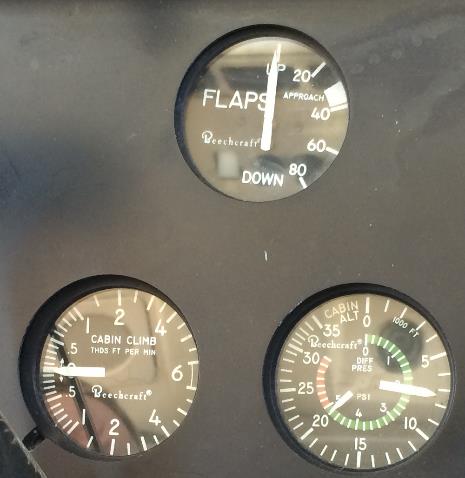
∆P is simply the difference between inside and outside pressure, cabin pressure vs. ambient pressure, ∆P = PCABIN – PAMBIENT. (PAMBIENT = PSTATIC. Same thing.) It is obvious where the ∆P gauge gets the PCABIN part of the equation…it is the same pressure that is used by the gauge for its cabin altitude display. But what about PAMBIENT? Where does this gauge measure outside pressure?
Of course, it must have a line connected to one of the airplane’s static sources. We have three of them in most King Airs: Pilot’s Normal static system, Copilot’s Normal static system, and Pilot’s Alternate static system. (Early model King Airs had only one Normal system that fed both Pilot and Copilot instruments and the Alternate system also fed into both sides. Check the static ports on the sides of the aft fuselage. Got two per side? That’s the newer, more widespread system. Got only one per side? You have the original, older system.)
The ∆P gauge ties into the Alternate Static System. You may recall from previous training that the alternate static air line goes from the selector lever – usually, but not always, on the cockpit’s right sidewall – to and through the aft pressure bulkhead. It terminates there, just above the “hellhole” access door on the bottom of the fuselage. The end of this line is quite close to the right side of the fuselage, an inch or so above the bottom skin. It is easily seen through an open hellhole door.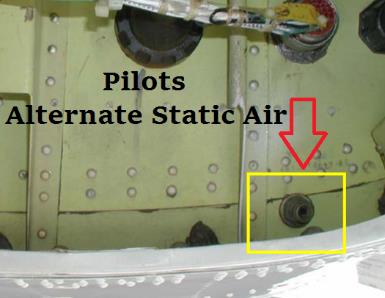
Because the selector valve in the cockpit sits higher than the pressure bulkhead hole, the static air line generally flows downhill from forward to aft so it has no moisture drain provided. Any condensation should drain automatically by flowing downhill. (That petcock drain you find behind the small, upholstered, access panel on the right side of the baggage compartment is a drain for the Outflow Valve’s control line, not a static line drain.)
Consider two malfunction scenarios involving the ∆P gauge. First, suppose the gauge reads low in cruise. Instead of seeing close to 6.5 psid in your lovely 250 you are seeing about 2.7 psid. (Any number lower than 6.5 would be OK for my example. 2.7 is just the number I picked.) Before you conclude that your pressurization system is weak perhaps due to excessive leaks and/or weak Flow Packs, look carefully at the combination gauge again. What Cabin Altitude is being displayed? If you’re cruising at, say, FL270 and only have 2.7 psid, your cabin must be quite high, in the vicinity of 19,000 feet. If that is indeed what you see – and the red Cabin Altitude warning annunciator is on and the oxygen masks deployed a while ago! – then you surely have a major pressurization problem.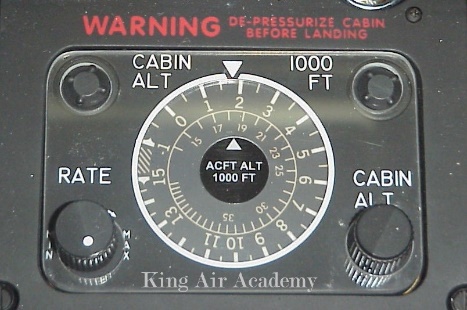
But what if the cabin altitude is right where it should be, close to 7,000 feet? Why is ∆P so low when the cabin pressure is not all that low? The answer must be that our PAMBIENT value is incorrect, is too high. And what could cause that? A leak in the alternate static air line between the selector lever and the aft pressure bulkhead that is allowing some of our cabin air to leak into the static line. So now the static line is no longer correctly reading outside, ambient, pressure but instead is feeling a higher pressure, somewhere between Ambient and Cabin.
Pop Quiz: What would happen to the pilot’s airspeed, altimeter, and vertical speed readings of you selected Alternate Air now? Answer: They’d all go down like a dropped anvil!
Here’s the second malfunction scenario, and a much rarer one: All has been fine until the descent begins. Now you observe the ∆P gauge is exceeding the redline value! The more you descend, the greater the ∆P becomes. Dang! We’re going to blow the door off!
Again, slow down and check the actual cabin altitude. Is it “normal,” somewhere between what it was in cruise and where it is going to be for your landing? If so, then ∆P cannot be too high. You merely have a ∆P gauge problem. Since ∆P = PCABIN – PAMBIENT and we are relatively sure that PCABIN is normal, the only way that ∆P can be high is for PAMBIENT to be incorrectly low.
The likely cause of this malfunction – albeit extremely unusual – is that somehow up at altitude something (ice?) clogged the alternate static air line. The low ambient pressure that it was sensing in cruise is now trapped and is not changing, not increasing as it should in a normal descent. Relax. Once the ice melts the ∆P reading should return to normal operation.
The takeaway here? The ∆P gauge not only reads Differential Pressure but can give us an idea of the correctness of our Alternate Static air system even before the selector lever has been moved to send that alternate air to our flight instruments.